
admin

is-it-necessary-to-use-vpn-on-mobile-network

Do I Need To Use VPN on Mobile Network? [Is it Necessary?]

In the era of smartphones, our lives have transformed dramatically. Our mobile devices have become an extension of ourselves, holding a lot of personal and sensitive data.

This makes it a potential target for cyber threats. As a result, one may wonder, do I need VPN on mobile cellular network?

The answer is yes, in many cases, especially when dealing with sensitive data.

A VPN, or Virtual Private Network, is a secure tunnel between your device and the internet. It shields your online activities from prying eyes, be it hackers, advertisers, or even your own internet service provider.


Quick Answer

Absolutely! A VPN on your mobile cellular network protects your personal information and improves your online privacy.

It encrypts your data, making it difficult for anyone, including hackers and your Internet Service Provider (ISP), to intercept and read your information.

Whether you’re accessing your bank account, sharing sensitive documents, or just browsing, a VPN can give you a secure connection even if you’re on a public Wi-Fi or using mobile data.

However, a key point to remember is that while VPN offers improved security and privacy, it might sometimes affect your internet speed.

Therefore, knowing when to switch it on and off based on your activity can be beneficial.

It’s also worth noting that a VPN can be more necessary on 5G networks due to the immense speed that 5G offers. More speed means more data can be transferred, potentially making it a bigger target for cybercriminals.


What is a VPN?

A Virtual Private Network, commonly known as a VPN, is a service that protects your data and online activities. It does this by creating a private network from a public internet connection.

VPNs mask your internet protocol (IP) address, making your online actions virtually untraceable. Importantly, VPN services establish secure and encrypted connections, ensuring greater privacy than even a secured Wi-Fi hotspot.

In essence, think of a VPN as your personal cloaked starship in the vast universe of the internet, it shields your presence, and your communications are encrypted so they can’t be intercepted or read by unwanted parties.

When you connect to the internet through a VPN, your data, whether it’s your browsing history, online purchases, or downloads, is sent through servers located elsewhere.

This not only keeps your data safe from potential hackers but also makes it appear as though your online activity is occurring in the server’s location, not your actual physical location.

Using a VPN on mobile devices, be it smartphones or tablets, operates under the same principle.

This becomes particularly crucial considering our smartphones hold a wealth of personal information, from banking apps to personal photos, which if fallen into the wrong hands, could lead to serious privacy issues.


Why Use a VPN on Your Mobile Device?

Security on Public Networks

Using a VPN on your mobile device is essential when connecting to public Wi-Fi networks. These networks are often insecure, making them a fertile ground for hackers and cybercriminals.

Using a VPN lets your data get encrypted, making it significantly harder for others to intercept and decipher.

Access to Geo-Restricted Content

Sometimes, you may find that certain content, like a video or a website, is not accessible in your region. This is due to geo-restrictions imposed by the content provider.

With a VPN, you can virtually change your location by connecting to a server in a region where that content is accessible. This makes VPN a useful tool for global content access.

Protection from Ad Tracking

Ad tracking can be quite invasive. Advertisers use your browsing history and other online activities to create a profile about you, then send targeted ads your way.

A VPN can help protect your privacy by masking your IP address and encrypting your online activities, making it difficult for advertisers to track you.


Pros and Cons of Using a VPN on Mobile

Let’s dive into some of the advantages and disadvantages of using a VPN on your mobile device. Knowing these will give you a more balanced view and help you make an informed decision.

The Good: Enhanced Privacy and More

  • Increased Privacy: When using a VPN, your data is encrypted and your IP address is hidden. This means that your online activities are private, keeping them out of sight from prying eyes, including your ISP.
  • Safe Public Wi-Fi Use: We’ve all connected to a public Wi-Fi network at some point, be it in a café, airport, or hotel. Unfortunately, these networks can be hunting grounds for hackers. With a VPN, you can safely use public Wi-Fi without the fear of your data being intercepted.
  • Access to Geo-Blocked Content: A VPN allows you to bypass geographical restrictions on content. For example, if a show is only available on US Netflix, you can still watch it by connecting to a VPN server located in the US.

The Not-So-Good: Possible Slowdowns and Other Limitations

  • Slower Internet Speeds: Since your data has to be encrypted and then sent to a VPN server possibly located far from you, it might slow down your internet speed. However, this can vary based on the quality of the VPN service you’re using.
  • Battery Drain: Running a VPN requires extra processing power, which can drain your battery faster.
  • Blocked by Some Services: Some websites and services can detect and block VPN users. For example, certain banks, streaming services, and online games might restrict access when they detect that you’re using a VPN.

Choosing the Right VPN for Your Mobile Device

If you’re convinced that a VPN is the way to go, the next step is choosing the right VPN service for your mobile device.

There are several factors to consider, but here are the most important ones:

Security and Privacy

Your chosen VPN should offer robust security features, such as strong encryption and a no-logs policy. This means they don’t store logs of your online activity.

Speed

While using a VPN can slow down your internet speed to some extent, a good VPN should minimize this effect. Look for VPNs known for their speed.

Reliability

Look for a VPN with reliable, high-uptime servers. You don’t want to deal with frequent disconnects or downtime.

Customer Support

Good customer support can be a lifesaver if you ever encounter problems or have questions about your VPN service.

Compatibility

Ensure the VPN you choose is compatible with your device’s operating system, be it iOS, Android, or others.


Frequently Asked Questions (FAQ)

Q1. Does using a VPN on mobile drain battery faster?

Yes, using a VPN on your mobile device can lead to faster battery drain. This is because running a VPN requires extra processing power for encrypting and decrypting data.

But with most modern smartphones, this effect is usually negligible.

Q2. Can I use a VPN with 4G and 5G mobile networks?

Yes, VPNs are compatible with all kinds of internet connections, including 4G and 5G mobile networks.

In fact, due to the high data transfer speeds of 5G, using a VPN might be even more necessary to protect the large amount of data being transmitted.

Q3. Does a VPN impact my mobile data usage?

While a VPN itself doesn’t consume extra data, the encryption process adds some overhead data, which might lead to slightly higher data usage. This increase, however, is typically minimal.

Q4. Is a VPN necessary if I only browse the web and don’t do sensitive transactions on my phone?

Even if you’re browsing the web, a VPN can be useful. Websites track your browsing behavior, and hackers can still target you.

A VPN masks your IP address and encrypts your internet connection, protecting your privacy even during simple web browsing.

Q5. Can I turn off my VPN sometimes?

Yes, you can turn off your VPN when you feel it’s not needed, such as when you’re at home on a secure network.

However, remember to turn it back on when connecting to public Wi-Fi networks or conducting sensitive online transactions.


Conclusion

In today’s digital age, privacy and security should never be an afterthought, especially when discussing mobile devices that carry so much personal information.

While using a VPN on mobile cellular networks might seem like an extra step, its security and privacy benefits are undeniable.

Remember, a VPN can protect you from potential cyber threats, allow you to bypass geo-restrictions, and secure your online activities from advertisers’ prying eyes.

Despite minor drawbacks such as possible slower internet speeds and increased battery drain, these are small prices to pay for keeping your digital life secure and private.

Ultimately, deciding to use a VPN on your mobile device comes down to your individual needs and your value of your online privacy and security.

Always remember that the internet can be a wild place, and a VPN is one of the tools to help you navigate it more securely.


Do I Need To Use VPN on Mobile Network? [Is it Necessary?] Read More »
is-vpn-affecting-phone-call-quality

Is Your VPN Affecting Your Phone Call Quality? [Explained]

Today, we’re diving into a question that’s been popping up a lot lately: “Does a VPN affect phone calls?

Before you start scrolling wildly down the page, we’ve got the quick answer right up here. But do stick around for the full scoop, because it’s worth knowing the ins and outs of this topic.


Quick Answer: Does a VPN Affect Phone Calls?

In short, a VPN can influence phone calls, but its impact depends on several factors.

If you’re using Voice Over Internet Protocol (VoIP) services, like Skype or WhatsApp calls, a VPN can help bypass geo-restrictions and enhance security.

But remember, it could potentially impact call quality depending on the speed and stability of your VPN service.


What is a VPN and How Does it Work?

A Virtual Private Network, better known as a VPN, is a type of service that allows you to connect to the internet via an encrypted tunnel.

This layer of encryption serves two main purposes: enhancing data security by shielding your online activities from prying eyes, and allowing you to mask your IP address, effectively enabling you to appear as if you’re browsing from a different location.

So, how does a VPN work? In simple terms, when you connect to a VPN, it encrypts your data and sends it through a secure tunnel to a server operated by the VPN company.

From there, your data is decrypted and sent to its destination on the internet. This process is repeated in reverse for data returning to you.

This setup ensures that your internet activity is kept private and secure from hackers, trackers, and even your own Internet Service Provider (ISP).

You might wonder, “Should VPN be on or off on my phone?” It depends on your specific needs. If you’re looking for more security and privacy, or want to bypass geographical restrictions, keeping your VPN on is a good idea.

But if internet speed is a priority, and you’re not concerned about these features, you may want to turn it off.


How VPN Interacts with Phone Calls

The interaction between VPNs and phone calls can be complex because it largely depends on the type of phone calls you’re making.

VPNs and Regular Phone Calls

Traditional phone calls, or those that use your mobile network, aren’t typically affected by VPN usage.

This is because these calls are routed through your cellular provider’s voice network, separate from your data network, where the VPN operates.

VPNs and VoIP Calls

On the other hand, VoIP calls made through services like Skype or WhatsApp use your data network, meaning they are affected by your VPN. The good news?

A VPN can provide added security by encrypting your calls, making them more difficult to intercept. Plus, a VPN can bypass geo-restrictions, allowing you to access VoIP services anywhere.

However, the potential downside is that VPNs could cause call latency or lower quality, depending on the speed and stability of the VPN service.

Essentially, your call’s data takes longer via the VPN server, which can introduce some delay or call drops.

VPNs and International Calls

When it comes to international calls, a VPN can be quite handy. It can help bypass country-specific restrictions, allowing you to place calls without any issues.

Additionally, if the VoIP service you’re using charges less for local calls, you could potentially connect to a VPN server in the same country as your call recipient to reduce costs.


Impact of VPN on the Quality of Phone Calls

VPNs, while offering an extra layer of security and privacy, can indeed affect the quality of your phone calls, particularly if those calls are made over VoIP services. Here’s how:

Potential Benefits of Using a VPN for Phone Calls

  • Security: VPNs encrypt your data, so your calls are more secure and less susceptible to interception. This can be especially important if you’re making business calls with sensitive information.
  • Geographical freedom: VPNs can help bypass geo-restrictions on VoIP services, allowing you to make calls from any location, to any location. Got a cousin in a country where WhatsApp is blocked? No problem with a good VPN.

Possible Drawbacks of Using a VPN for Phone Calls

  • Speed and quality: Since a VPN routes your data through an additional server, it can affect your connection’s speed. This might result in call drops or lower call quality due to increased latency.
  • Battery drain: VPNs can consume more power, which might drain your phone’s battery faster. If you’re on a marathon call session, you might want to keep your charger handy!

Does a VPN Influence the Cost of My Phone Calls?

A common question is whether using a VPN can influence the cost of phone calls. The simple answer is: it depends.

Regular Phone Calls

If you’re making regular phone calls via your mobile network, using a VPN won’t affect the cost of these calls. These calls are billed according to your mobile provider’s plan and are separate from your data usage.

VoIP Calls

For VoIP calls, the story is a bit different. The cost of VoIP calls is usually determined by your internet provider or VoIP service, not by the VPN. But, here’s where it can get tricky.

If your VoIP service charges differently based on location, using a VPN to change your location could potentially impact the cost.

For instance, if you’re in the US and you use a VPN to appear as though you’re calling from the UK, the VoIP service might charge you at their UK rates, which could be higher or lower than their US rates.

Always double-check your VoIP service’s pricing rules!

Note that using a VPN itself can also have costs associated. Many high-quality VPNs require a subscription, usually in USD.

And while there are free VPNs available, they may have limitations on data, speed, and server availability, which could impact your call quality.


Frequently Asked Questions (FAQ)

Let’s take a quick look at some of the most frequently asked questions about VPNs and phone calls.

Q1. Does a VPN affect regular phone calls?

Regular phone calls that use your mobile network are typically unaffected by VPN usage as these calls are routed through your cellular provider’s voice network, separate from your data network where the VPN operates.

Q2. How does a VPN affect VoIP calls?

A VPN can enhance the security of VoIP calls by encrypting the data, making it more difficult to intercept. Plus, it can bypass geo-restrictions, enabling you to access VoIP services from anywhere.

However, it may potentially affect call quality, depending on the speed and stability of the VPN service.

Q3. Can a VPN reduce the cost of my calls?

Potentially, yes. If your VoIP service charges differently based on location, using a VPN to appear as if you’re calling from a different location might impact the cost.

For example, if you’re in the US and your VoIP service charges less for calls within the UK, using a VPN to appear as though you’re calling from the UK could reduce your call costs.

Q4. Does using a VPN drain my phone battery?

VPNs can consume more power, so they might drain your phone’s battery faster. If you’re planning a long call session, you might want to keep your charger handy!


Conclusion

In conclusion, while VPNs can offer enhanced security and privacy for your online activities, including VoIP calls, they may also introduce potential challenges such as reduced call quality and increased battery consumption.

Whether or not you should use a VPN while making phone calls depends on your specific needs and circumstances.


Is Your VPN Affecting Your Phone Call Quality? [Explained] Read More »

pros-cons-using-vpn-for-business

11 Pros and Cons of Using VPN for Business [Explained]

Today, we’re delving into the virtual world of Virtual Private Networks (VPNs). If you’ve ever wondered about the pros and cons of VPN for business, you’ve landed on the right page.

This blog post aims to help you understand the good, the bad, and everything in between about using a VPN for business.

Businesses, large and small, are turning to VPNs to secure their internet connections. These digital tools, known for their abilities in network security, remote access, and data encryption, are now becoming business essentials.

But just like any other technology, VPNs have their advantages and potential challenges. Let’s unpack them!

In our upcoming sections, we’ll answer the top pros and cons of VPNs for businesses, delve deeper into 11 key pros and cons, and address frequently asked questions.


What Are the Pros and Cons of Using VPN for Business

Here are the eleven (11) advantages and disadvantages to take note of;

Let’s begin with the Pros.


Pro 1: Enhanced Security

VPNs enhance security by using advanced encryption protocols to ensure that data is securely transferred. By encrypting data, VPNs make it much more difficult for cybercriminals to access sensitive information.

Pro 2: Remote Access

VPNs allow employees to securely access a business network from anywhere, making them ideal for businesses with remote employees or those who travel frequently.

Pro 3: Increased Privacy

VPNs hide your business’s IP address, effectively masking your online activity. This increased privacy can help protect your business from potential threats and intrusions.

Pro 4: Cost-Effective

When considering its security benefits, a VPN can be a cost-effective solution for businesses. It can help prevent potentially expensive data breaches and cyber attacks.

Pro 5: Bypass Geographic Restrictions

VPNs allow you to bypass geographic restrictions, allowing access to content and services not normally available in your location. This is especially helpful for businesses that operate globally.

Pro 6. Secure Data Sharing

A VPN is essential if your business involves sharing sensitive data with employees, clients, or other stakeholders. It enables you to securely share files over a network, reducing the risk of data leakage or interception.

Next, we will cover the Cons.

Con 1: Potential Speed Issues

Because VPNs encrypt and decrypt data, they can sometimes slow down internet speeds. This could potentially hinder productivity for businesses that rely heavily on quick connections.

Con 2: Complex Setup and Maintenance

Setting up and maintaining a VPN can be quite complex, especially for businesses without a dedicated IT team. It requires technical knowledge and ongoing maintenance to ensure optimal performance and security.

Con 3: Regulatory Compliance Challenges

Some countries have restrictions or regulations regarding the use of VPNs. Businesses operating internationally need to be aware of these laws to avoid legal issues.

Con 4: Requires Trust in VPN Provider

Your VPN provider has access to your internet activity. Therefore, choosing a reputable VPN provider you trust to handle your data responsibly is crucial.

Con 5: Potential Security Breaches

While VPNs enhance security, they’re not invulnerable to breaches. If a VPN provider has weak security measures, it could potentially expose your business to risks.


Choosing a VPN: What to Consider

Deciding whether to use a VPN is only the first step. If you’ve weighed the pros and cons and decided a VPN is a good fit for your business, several important factors should be considered when choosing a VPN provider.

Security and Privacy Features: Your chosen VPN should offer robust security features, including advanced encryption standards and IP address masking. Investigate whether they have a no-logs policy, meaning they don’t keep a record of your online activities.

Speed: As we mentioned, VPNs can sometimes slow down your internet connection because they encrypt and decrypt data. So, check reviews and do trials to find a VPN provider that offers the fastest speeds.

User-Friendliness: A VPN shouldn’t be complicated to use. Look for a provider that offers user-friendly applications for all your business devices.

Customer Support: Reliable customer support is crucial. If you encounter any issues, it’s reassuring to know that help is just a call or an email away.

Cost: VPN services come at varying price points. Consider your budget and remember that while a free VPN might be tempting, they often lack the advanced features a business might need.


Frequently Asked Questions (FAQ)

We’ve compiled some of the most common questions about VPNs for business. Here are the short and quick answers.

1. Should a business use a VPN?

Absolutely. A VPN offers enhanced security, remote access, and increased privacy – making it a worthwhile investment for many businesses.

2. What are the downsides of using a VPN for business?

Some potential challenges include slower internet speeds due to encryption, complex setup and maintenance, and potential legal implications depending on your location.

3. Are free VPNs good for business use?

While free VPNs may be appealing, they often lack the robust security features, speed, and customer support that businesses need. A paid VPN is typically a better choice for businesses.

4. Can a VPN completely protect my business from cyber threats?

While a VPN significantly enhances your business’s online security, it’s not foolproof. Businesses should use VPNs as part of a comprehensive cybersecurity strategy.

5. Does using a VPN mean my business is compliant with data privacy laws?

Not necessarily. While a VPN improves privacy and security, it’s just one compliance aspect. Businesses should ensure they’re following all relevant data protection and privacy laws in their area.


Conclusion

In the digital age, protecting your business’s online activities is more critical than ever. With their ability to enhance security, ensure privacy, and provide remote access, VPNs offer a viable solution for many businesses.

However, they are not without their challenges. Potential speed issues, the complexity of setup, and regulatory compliance are valid considerations that may affect your decision.

Remember, the key is understanding your business needs and choosing a VPN provider that aligns with those needs.

Remember the phrase, “Don’t put all your eggs in one basket?” The same applies to your business’s online security.

While VPNs are a powerful tool, they should be part of a broader cybersecurity strategy, which might include measures like two-factor authentication, data backups, and regular employee training on cybersecurity.


11 Pros and Cons of Using VPN for Business [Explained] Read More »

benefits-of-vpn-for-business

7 Benefits of Using VPN for Business [Reasons Why]

Welcome to our deep dive into the fascinating world of Virtual Private Networks or VPNs, specifically, their business value.

In today’s digital landscape, businesses constantly search for methods to secure their data and enhance operational efficiency. VPNs often emerge as an essential tool in this quest.

As we discuss the reasons and benefits of using VPN for business, you’ll learn how a VPN not only provides enhanced security, but can also offer your business a competitive edge.

From data encryption to remote access and network security, the benefits of a VPN can be transformative for your business.


What is a VPN? A Brief Overview

A VPN, or Virtual Private Network, is a technology that creates a secure and encrypted connection over a less secure network, such as the internet.

It was initially created to connect business networks securely over the internet or allow you to access a business network from home.

Using a VPN, your internet connection becomes shielded and encrypted.

This means that all the data you send or receive is hidden from prying eyes, providing privacy and security when browsing the internet, particularly important when using public Wi-Fi networks.

Moreover, VPNs provide an essential service in today’s internet age: they hide your IP address, making your online activities virtually untraceable, and they offer greater privacy than even a secured Wi-Fi hotspot can.


Why Businesses Need a VPN: Top Reasons

Now that you have a grasp of what a VPN is, let’s delve into why businesses should consider using one. Here are the top five reasons:

1. Enhanced Security

In an age where data breaches and cyber attacks are becoming increasingly common, VPNs provide a crucial layer of security for businesses. By encrypting data transferred across the network, VPNs make it much harder for cybercriminals to intercept sensitive information.

2. Remote Access

The shift to remote work has accelerated in recent years, and VPNs play a crucial role in supporting this model. A VPN allows employees to securely access the company’s network from any location, ensuring that remote work doesn’t compromise the business’s security.

3. Secure Data Sharing

A VPN is essential if your business involves sharing sensitive data with employees, clients, or other stakeholders. It enables you to securely share files over a network, reducing the risk of data leakage or interception.

4. Online Anonymity

Businesses also have a need for online privacy. VPNs hide your business’s IP address, helping safeguard your online activities from competitors or anyone looking to track your business’s digital footprint.

5. Bypass Geographical Restrictions

Some online services and resources may be inaccessible in certain locations due to geographical restrictions. VPNs allow you to bypass these limitations, providing your business with unrestricted access to online content and resources globally.


Seven Major Benefits of Using VPN for Business

Having a VPN has become nearly essential for businesses to protect their sensitive data and improve overall operational efficiency.

Let’s discuss the seven major benefits your business could enjoy by implementing a VPN:

Increased Data Security

VPNs add a significant layer of security to your business operations by encrypting all the data transferred between your network and the end users. It helps keep sensitive business information secure during transmission, mitigating the risk of cyberattacks.

Better Remote Access

VPNs enable your employees to access your business network from anywhere in the world securely. This ensures that working remotely or on-the-go doesn’t compromise the security of your business data, making a VPN essential in today’s increasingly remote work culture.

Improved Network Performance

Believe it or not, implementing a VPN can actually improve your network performance. VPN service providers often have high-speed servers and can help optimize your network’s performance, ensuring faster data transmission.

Cost Savings

VPNs could lead to substantial cost savings over time. How so? By avoiding the hefty costs associated with data breaches, and through enabling remote work, you can save on the overhead costs of maintaining physical office spaces.

Enhanced Privacy Protection

VPNs offer a high level of privacy by masking your IP address. This feature helps maintain your business’s online anonymity, protecting you from anyone trying to track your digital activities.

Ability to Access Global Content

Using a VPN can bypass geographical restrictions, allowing your business to access global content, resources, and services that would otherwise be unavailable. This feature can be particularly beneficial for businesses operating in multiple locations.

Greater Business Flexibility

With secure remote connections, VPNs allow your business to operate from different locations without compromising data security or network performance.

What to Consider When Choosing a VPN for Business

The right VPN can do wonders for your business. But how do you choose the best one? Here are a few things to consider:

Security Features

Look for a VPN with strong security protocols and encryption techniques. Features like kill switches and leak protection can add extra layers of security.

Number of Servers

A VPN with a wide network of servers can provide better speed and reliability. More servers also mean more locations to choose from, useful for bypassing geo-restrictions.

Speed and Performance

VPNs can sometimes slow down your internet speed due to encryption and the distance data travels to the VPN server. Ensure that the VPN you choose offers good speed and performance.

Price

While free VPNs can be tempting, they often come with limitations and are less secure. Paid VPNs, while costing more, generally offer superior security, performance, and features.

Customer Support

Look for a VPN provider with strong customer support to ensure any issues can be promptly resolved.


Frequently Asked Questions (FAQ)

Here are some common questions people often ask about using VPNs for business:

Q1: Can a VPN increase my internet speed?

A: While VPNs are not designed to increase your internet speed, some users may experience improved performance due to the VPN avoiding bandwidth throttling by your internet service provider.

Q2: Is it legal to use a VPN?

A: In most countries, including the US, UK, and Canada, the use of VPNs is perfectly legal. However, what you do with it can be illegal – for example, downloading copyrighted materials. Also, some countries like China and Russia have strict VPN regulations.

Q3: Can I use a free VPN for my business?

A: While using a free VPN is possible, it’s not advisable for businesses. Free VPNs often have limitations on bandwidth, data caps, and security features. They also tend to have more users sharing the same IP addresses, leading to slower speeds.

Q4: Does a VPN protect you from viruses?

A: No, a VPN doesn’t protect you from viruses. Its primary function is to secure your internet connection and keep your online activities private. To protect against viruses, you’ll need to use antivirus software.


Conclusion

In today’s digital age, using a VPN for business is not just an added advantage but a necessity. It provides enhanced security, allows remote access, and even improves network performance.

By hiding your IP address and encrypting your data, VPNs also help maintain your privacy online and protect your business information from potential cyber threats.

Whether you’re a small business owner or run a multinational corporation, the benefits of a VPN can’t be overstated.

But remember, not all VPNs are created equal. You need to choose a service that aligns with your business needs and provides the security features, speed, performance, and customer support you need.

As we’ve mentioned earlier, businesses also need to consider how a VPN will affect their network’s performance and consider any legal issues surrounding its use.

But once you’ve done your due diligence, you’ll find that the benefits of a VPN far outweigh these considerations.

In a world where data breaches are all too common and remote work is increasingly prevalent, a VPN’s security and flexibility are invaluable.

So if you’re still on the fence about whether or not your business needs a VPN, the answer is clear: it does.


7 Benefits of Using VPN for Business [Reasons Why] Read More »

always-on-VPN-disadvantages

7 Disadvantages of Always-On VPN [The Downsides Explained]

Welcome to the world of VPNs, where privacy meets convenience. But like every coin has two sides, even the most reliable technologies have their drawbacks.

Today, we will delve into the disadvantages of always-on VPNs.

Before we hop into the key disadvantages, it’s essential to understand what we’re dealing with.

A Virtual Private Network (VPN) is a technology that establishes a safe and encrypted connection over a less secure network, such as the internet.

The ‘always-on‘ feature means that your device is continuously connected to the VPN, protecting your data around the clock. But is there such a thing as too much protection? Let’s find out!


What Are The Drawbacks of Having Always-On VPN Connection?

While an always-on VPN provides round-the-clock security and privacy, it’s not without its downsides.


1. Slower Internet Speed

One of the main disadvantages of an always-on VPN is slower internet speed. When you use a VPN, your data is encrypted and sent through a secure server, which can be located anywhere in the world.

This process ensures your online activity remains private but requires extra time and resources, leading to slower internet speeds.

Think of your internet connection like a highway. Normally, data packets can take the most direct route to their destination, like a car speeding down an open road.

But with a VPN, it’s like adding a detour through a busy city. This can slow down your internet connection, particularly if the VPN server is far away or overloaded with users.

Additionally, VPNs’ encryption and decryption process require processing power, which can slow down your device, particularly if you’re using an older model.


2. Potential Data Limits

Another potential downside of an always-on VPN is the issue of data limits. This is especially relevant if you are using a free or low-cost VPN service.

Many VPN providers impose data caps to manage traffic and reduce costs.

When your VPN is always on, all your online activities, from browsing and streaming to gaming and downloading, are routed through the VPN server.

This can quickly use up your data allocation, especially if you engage in data-intensive activities like 4K streaming or online gaming.

Once you’ve hit your data cap, you may experience throttled speeds or have to pay for additional data, both of which can be inconvenient and costly. This makes an always-on VPN less suitable for heavy internet users.


3. Increased Battery Usage

It’s no secret that running a VPN on your device uses more energy than a direct connection to the internet. This is because encryption and decryption processes associated with a VPN require additional computational power.

When your VPN is always on, this can lead to a faster drain on your device’s battery.

This is especially noticeable on portable devices like smartphones and laptops, where battery life is a key concern. Increased battery drain may not be a big deal if you mostly work from a home or office location with easy access to power outlets.

However, for those who are frequently on the move, an always-on VPN could mean finding yourself with a dead battery at an inconvenient time.


4. Compatibility Issues

The next disadvantage is compatibility issues. Not all devices and applications function optimally with an always-on VPN.

Some devices may not support VPN use at all, while others might only work with certain VPN protocols.

You may also run into issues with specific applications. Certain programs and online services have restrictions or bans on VPN use.

For example, some streaming platforms block VPN connections to enforce region-based content restrictions.

Moreover, you might experience problems with certain functions on your devices.

For instance, if your device is always connected to a VPN, it could prevent file sharing between devices on your local network, as your device appears to be connected from a different location.


5. Difficulty Accessing Local Network Resources

Having an always-on VPN can create difficulties in accessing local network resources.

This issue becomes apparent when you’re connected to networks like your home or work network, and you need to use printers, file servers, or other shared resources.

With an always-on VPN, your device is virtually placed in a different network, which can prevent you from reaching devices on your local network.

This issue can be especially problematic in a business environment, where accessing shared drives and printers is essential for daily operations.

Some VPN services offer split tunneling, a feature that allows certain apps to bypass the VPN and use the regular, unencrypted internet connection, but this might complicate your setup and somewhat negate the always-on aspect of your VPN.


6. Continuous Cost

Another potential disadvantage of an always-on VPN is the continuous cost. While free VPN services are available, they often have limitations such as data caps, slower speeds, and fewer server options.

For a reliable, always-on VPN service, you’re likely going to opt for a premium subscription.

Premium VPN services offer unlimited data, faster speeds, and more server options, but they come with monthly or annual fees.

If your VPN is always on, you’ll need a high-quality service to ensure a smooth user experience, which means you’ll be paying these fees continuously.

Furthermore, if you’re using a VPN on multiple devices, you may need to pay additional costs to cover all of them. These costs can add up over time, making an always-on VPN a potentially expensive investment.


7. Privacy Concerns

Privacy is a significant reason many people use a VPN, so seeing it listed as a disadvantage might sound strange.

However, if your VPN provider keeps logs of your activity, using an always-on VPN means they have access to more of your data.

Although many VPNs advertise a strict “no-logs” policy, the reality can be somewhat different. Some may retain minimal data, such as connection times and data usage, while others may keep more detailed records.

When your VPN is always on, this means more of your data is potentially being logged.

This issue raises potential privacy concerns, especially if the VPN provider is based in a country with mandatory data retention laws or a member of the ‘Fourteen Eyes’ intelligence alliance.


Frequently Asked Questions (FAQ)

Q1. Is it bad to have a VPN on all the time?

Having a VPN on all the time is not inherently bad. It adds an extra layer of security and privacy to your online activities. However, it can have disadvantages, such as slower internet speeds, increased battery usage, potential data limits, compatibility issues, difficulty accessing local resources, ongoing costs, and potential privacy concerns if your VPN provider keeps logs.

Q2. Can an always-on VPN slow down my internet speed?

Yes, an always-on VPN can slow down your internet speed. This is due to the time required to encrypt your data and the longer route it takes through the VPN server. The impact on speed can vary depending on the VPN provider, server location, and your original internet speed.

Q3. Does an always-on VPN use more battery?

Running a VPN on your device uses more energy, leading to faster battery drain. This is because encrypting and decrypting data requires additional computational power.

Q4. Does an always-on VPN affect access to local network resources?

Yes, an always-on VPN can affect access to local network resources like printers and file servers. This is because the VPN places your device in a different network, which can prevent you from reaching devices on your local network.

Q5. Can using a VPN continuously be costly?

Yes, continuous use of a VPN can be costly, particularly if you opt for a premium VPN service, which provides unlimited data, faster speeds, and more server options. The cost can increase further if you use the VPN on multiple devices.

Q6. Does an always-on VPN lead to privacy concerns?

While a VPN is often used for privacy, it can potentially lead to privacy concerns if your VPN provider keeps logs of your activity. Using a VPN all the time means more of your data could be logged, especially if your provider does not adhere to a strict no-logs policy.


Conclusion

An always-on VPN provides constant security and privacy for your online activities. However, this constant protection comes with its own set of challenges.

From slower internet speeds and potential data limits to increased battery usage, compatibility issues, difficulty accessing local network resources, continuous costs, and even privacy concerns, an always-on VPN might not be the best choice for everyone.

The key is understanding your needs and the implications of always having a VPN active. In some cases, the benefits outweigh the disadvantages, especially if security and privacy are your top priorities.

Conversely, if you rely heavily on fast internet speeds, frequent access to local network resources, or operating on a tight budget, an always-on VPN might prove more of a hindrance than a help.

Ultimately, your decision should be based on a balanced assessment of your personal or organizational needs, your budget, and your tolerance for the potential inconveniences that an always-on VPN may bring.

Remember that while a VPN is an important tool for online security, it’s not the only one. Other steps, like maintaining up-to-date antivirus software and practicing good digital hygiene, are equally important.


7 Disadvantages of Always-On VPN [The Downsides Explained] Read More »

protonvpn-save-battery

Does Protonvpn Drain Battery? [3 Methods to Save Battery]

Virtual Private Networks (VPNs) have become an essential tool for many internet users. They help to provide security and privacy while browsing the internet.

One such popular VPN is ProtonVPN. Users often wonder, does ProtonVPN drain battery?

The quick answer is: Yes, it can. Like any other app, ProtonVPN does consume some amount of battery life. But the drain isn’t significant unless you constantly use the VPN on a high-speed setting.

The exact battery usage depends on several factors which we’ll explore further in this post.


Quick Answer: Does ProtonVPN Drain Battery?

Like most VPN services, ProtonVPN can consume more battery than regular internet browsing.

This is because it requires extra processing power to encrypt and decrypt data, and to maintain a secure connection with the VPN server.

However, the battery drain isn’t overly significant, unless you’re using the VPN on a high-speed setting consistently.

You may have wondered, “How do I stop my VPN from draining my battery?” The good news is, there are steps you can take to minimize the battery consumption while using ProtonVPN.


Understanding ProtonVPN and Its Power Consumption

VPN services, including ProtonVPN, function by creating an encrypted tunnel between your device and a server located elsewhere.

This encryption process adds a layer of security and privacy to your internet activities but also requires additional computational power. The extra processing can lead to increased battery usage.

So, why does VPN consume battery? Primarily, the extra power is needed for:

  • Data Encryption and Decryption: VPNs work by encrypting your data before it leaves your device, then decrypting it once it arrives at the VPN server. This process can be computationally intensive, especially for high-strength encryption, which can lead to increased battery drain.

  • Maintaining a Secure Connection: The VPN must keep a constant secure connection to the VPN server. This involves regular data exchanges, even when you’re not actively using your device, leading to more battery use than regular internet browsing.

Factors That Contribute to Battery Drain While Using ProtonVPN

While ProtonVPN does contribute to battery usage, it’s important to remember that many factors can affect the extent of the drain. Let’s delve into some of these elements:

  • Device Settings: The settings on your device can significantly influence battery consumption. For example, if your screen brightness is at its maximum, or if multiple applications are running in the background, these can lead to faster battery drain.
  • Signal Strength: Poor network signal strength can cause your device to work harder to maintain a connection, which can contribute to faster battery usage. This applies to both your cellular data signal and your Wi-Fi signal.
  • VPN Usage: How you use ProtonVPN can impact your battery life. For example, if you’re constantly streaming content or downloading large files, this could lead to increased battery drain.
  • VPN Protocol: The VPN protocol you choose can affect battery consumption. For instance, protocols like OpenVPN are secure but can be more power-intensive than others, such as IKEv2.

Does ProtonVPN Drain More Battery Than Other VPNs?

A common question among VPN users is whether ProtonVPN drains more battery than other VPNs? Well, the answer largely depends on how each VPN operates, their encryption, and their server speeds.

While it’s hard to give a definitive answer without specific comparisons, ProtonVPN generally falls within the average range of battery consumption for VPNs.

It’s neither the most nor the least power-consuming VPN out there.


How to Save Battery While Using ProtonVPN

Here are the three (3) methods you can use;


Method 1: Reduce Battery Drain by Adjusting Your Device Settings

The first method to minimize battery drain while using ProtonVPN involves tweaking some of your device settings. Here’s how:

  • Lower Screen Brightness: Dimming your screen can save significant battery life. Alternatively, the auto-brightness setting adjusts the screen based on surrounding light conditions.
  • Close Unnecessary Apps: Having many apps open in the background can quickly drain your battery. Close apps you’re not using to conserve power.
  • Turn Off Push Email: If your email account is set to push, consider changing it to fetch. This means your device will retrieve new emails at set intervals, rather than constantly checking for new messages.
  • Update Your Device: Make sure your device is running the latest software. Updates often include performance improvements that can extend battery life.

Method 2: Optimize ProtonVPN Settings for Battery Life

The second way to save battery while using ProtonVPN is to optimize the VPN’s settings. Here are some steps you can take:

  • Choose the Right Protocol: Some VPN protocols use more power than others. For instance, IKEv2 is known for being less power-intensive than OpenVPN. If your device and the ProtonVPN app support it, consider switching to IKEv2.
  • Use Split Tunneling: ProtonVPN supports split tunneling, which allows you to choose which apps use the VPN and which do not. By limiting the VPN usage to only essential apps, you can potentially save battery life.
  • Disconnect When Not in Use: If you don’t need to always use the VPN, consider disconnecting when it’s not in use. This can help conserve battery life.

Method 3: Enhancing Battery Life with Device Maintenance

The third method for conserving battery while using ProtonVPN involves general device maintenance. Keeping your device in good condition can contribute to overall battery life. Here’s how:

  • Regular Updates: Keep your device and all your apps updated. Software updates often include patches that fix bugs and improve power efficiency.
  • Battery Saving Mode: Most devices come with a battery saving mode that can extend battery life by reducing performance and limiting background activities. Consider enabling this when your battery is running low.
  • Restart Your Device Regularly: Regular restarts can help clear temporary files and stop unnecessary processes running in the background, which can enhance battery performance.

Frequently Asked Questions (FAQ)

This section’ll address some of the most commonly asked questions related to ProtonVPN and its impact on battery life.

Q1. Does ProtonVPN consume more battery on mobile devices compared to laptops?

Generally, mobile devices have smaller batteries than laptops, and thus, might experience a more noticeable battery drain when using ProtonVPN or any other VPN.

However, the actual battery consumption can vary greatly depending on device settings, network conditions, and VPN usage.

Q2. Why does my battery drain faster when using ProtonVPN on cellular data instead of Wi-Fi?

When using cellular data, your device may consume more power due to the potentially weaker signal strength and the higher power requirements for transmitting data over cellular networks.

Hence, you might notice a faster battery drain when using ProtonVPN on cellular data.

Q3. Can ProtonVPN work in battery saving mode?

Yes, ProtonVPN can work in battery saving mode. However, your device may restrict some VPN activities in this mode to conserve power, potentially affecting VPN performance.


Conclusion

While it’s true that using ProtonVPN can increase your device’s battery consumption, it’s far from the only factor at play. Your device settings, network conditions, and VPN use can all contribute to battery drain.

However, you can optimize your device and ProtonVPN settings to minimize power usage by implementing the methods we’ve outlined.

Remember, using a VPN like ProtonVPN is critical for maintaining privacy and security online, and a slight increase in battery usage is a small price to pay for these benefits.

From addressing issues like ProtonVPN getting stuck on assigning IP to helping you understand how ProtonVPN can change your location, we’re here to ensure your ProtonVPN experience is as smooth as possible. Stay connected, stay secure!


Does Protonvpn Drain Battery? [3 Methods to Save Battery] Read More »

protonvpn-work-in-school

Does ProtonVPN Work at School? [And How to Fix Not Working]

If you’ve wondered “Does ProtonVPN work at school?”, you’re not alone. Many students are searching for ways to bypass certain online restrictions that may be implemented in their school’s network system.

This is where ProtonVPN comes into the picture.

ProtonVPN is a virtual private network (VPN) service provider operated by the Swiss company Proton Technologies AG behind the highly respected ProtonMail service.

It helps users secure their internet connection and provides greater access to content that might be restricted within a specific geographical area or, in this case, the school’s network.

But does it work in a school setting? Can it bypass the school’s Wi-Fi restrictions? Let’s delve into it.

In this blog post, we’ll discuss if and how ProtonVPN works in a school setting, how to set it up, methods for troubleshooting connection issues, and even some ethical considerations of using VPNs.


Quick Answer: Does ProtonVPN Work at School?

Yes, ProtonVPN does work at school. It can bypass school internet restrictions, allowing you to access blocked websites or apps.

However, its effectiveness may vary depending on your school’s network security measures.

The question that might come next to your mind is, “Does ProtonVPN work on school Wi-Fi?” Yes, it does. ProtonVPN encrypts your connection and can make your online activities undetectable over the school’s Wi-Fi network.


What is ProtonVPN and How Does It Work?

ProtonVPN is a popular VPN provider known for its strong focus on user privacy and security. But how does it work, and what sets it apart?

Understanding VPNs

Virtual Private Networks, or VPNs, create a secure tunnel between your device and the internet. All the data you send and receive travels through this encrypted tunnel, making it difficult for third parties to track your online activities.

This enhances your online privacy and helps you bypass geo-restrictions and network limitations, as is often the case with school Wi-Fi networks.

The Role of ProtonVPN

ProtonVPN, specifically, takes these VPN benefits a notch higher. Apart from providing a secure and private internet connection, it offers advanced security features like a no-logs policy, DNS leak protection, and a kill switch.

The latter is crucial for maintaining your online privacy should your VPN connection drop unexpectedly. You can learn more about it and how to troubleshoot if it’s not working on our ProtonVPN kill switch guide.

Moreover, ProtonVPN also offers the Secure Core feature, which routes your connection through multiple servers before leaving ProtonVPN’s network, adding an extra layer of protection.

These features make it a reliable choice for secure internet browsing at home, work, or school.


Why Would You Need ProtonVPN at School?

Schools often have network restrictions in place to maintain a safe, focused learning environment. While these restrictions are well-intentioned, they might sometimes limit access to legitimate educational content.

This is where ProtonVPN comes into play.

Unblocking Content

ProtonVPN can help bypass these restrictions by masking your device’s IP address and making it appear as though it’s located in a different geographical region.

This can be especially useful for accessing geo-restricted academic databases, research materials, or streaming platforms for educational videos.

If you’re curious about how ProtonVPN can help change your location, read our post on Can ProtonVPN change my location?

Privacy and Security

Beyond unblocking content, ProtonVPN also enhances your online privacy and security. Schools, like any other public Wi-Fi networks, can be vulnerable to cyber threats.

Using ProtonVPN encrypts your internet connection, preventing unauthorized access to your data and protecting you from potential cyber threats.


How to Set Up ProtonVPN for School Use

Setting up ProtonVPN for use at your school is pretty straightforward. However, always remember to respect your school’s guidelines regarding internet usage.

Here’s how to get started:

Method 1: Basic Setup

  • Download and install the ProtonVPN app on your device. The app is available on various platforms, including Windows, macOS, Linux, Android, and iOS.
  • Open the app and log in with your ProtonVPN account. If you don’t have an account yet, you’ll need to create one.
  • Once logged in, select a server from the list and click “Connect.” Try choosing a server close to your location for the best speed.

Method 2: Advanced Configuration for More Stability

If you frequently experience unstable connections, you might want to adjust some settings:

  • Try switching between UDP and TCP in the settings. TCP is more reliable, while UDP is faster.
  • Change your VPN protocol. ProtonVPN supports OpenVPN and IKEv2/IPSec. Switching between these can sometimes improve stability.

If you’re having trouble with slow ProtonVPN speeds, check out our guide on how to speed up a slow ProtonVPN connection.

Method 3: Using ProtonVPN with Other Devices

You can also set up ProtonVPN on other devices, like your smartphone or tablet, following the steps above. However, be aware that simultaneous connections depend on your ProtonVPN plan.


Troubleshooting ProtonVPN Connection Issues at School

If you’re experiencing issues when trying to connect ProtonVPN at school, don’t panic. These problems are often easily fixable.

Here are three reliable methods to troubleshoot:

Method 1: Switch Servers

Sometimes, certain servers might not work well with your school’s network due to various reasons. If you’re having difficulty connecting, try switching to a different ProtonVPN server.

Remember, servers closer to your actual location tend to offer better speeds.

Method 2: Change VPN Protocols

ProtonVPN supports different VPN protocols, including OpenVPN (UDP/TCP) and IKEv2. If one protocol doesn’t work well, you can switch to another.

OpenVPN UDP generally offers the best balance between speed and security. However, if you’re facing connectivity issues, try switching to OpenVPN TCP or IKEv2.

Method 3: Check Your Device’s Settings

If you’re still having issues, there might be a problem with your device’s network settings. Verify if your device is correctly set up to work with ProtonVPN.

If you’re unsure, you can refer to ProtonVPN’s official setup guides for different platforms.


Ethical Considerations When Using ProtonVPN at School

While ProtonVPN can help bypass certain network restrictions, it’s important to use it responsibly. Let’s take a look at a few ethical considerations:

Respect School Policies

Most importantly, you must adhere to your school’s internet usage policies. Schools often restrict access to certain websites to maintain a safe and focused learning environment.

Using a VPN to bypass these restrictions might violate these policies. Be sure to fully understand and respect your school’s rules regarding VPN use.

Use for Legitimate Purposes

While ProtonVPN can technically be used to access restricted content, it should only be used for legitimate educational purposes.

Misuse can lead to disciplinary actions and even legal consequences.

Understand the Risks

Lastly, while ProtonVPN is highly secure, no VPN can provide 100% security or anonymity. Be mindful of your online activities and remember you’re still responsible for your actions while connected to the VPN.


Frequently Asked Questions (FAQ)

In this section, we’ll tackle some commonly asked questions about using ProtonVPN at school.

Q1. Does ProtonVPN work on school Wi-Fi?

Yes, ProtonVPN should work on school Wi-Fi. However, some schools might have network security measures in place that could interfere with VPN connectivity. If you encounter issues, refer to our troubleshooting guide above.

Q2. Can the school detect if I’m using ProtonVPN?

Schools with advanced network monitoring tools might be able to detect VPN usage, including ProtonVPN. However, they wouldn’t be able to see what you’re doing online thanks to the VPN’s encryption.

Q3. Is it legal to use ProtonVPN at school?

The legality of using a VPN, including ProtonVPN, depends on local laws and the school’s policies. Always make sure to check these before using a VPN at school.

Q4. Can I use ProtonVPN on my school-issued device?

It depends on the school’s policies and whether you have the necessary administrative privileges to install software on the device. If you’re unsure, it’s best to ask your school’s IT department.

Q5. Can ProtonVPN slow down my internet speed?

While a VPN can sometimes slightly reduce your internet speed due to the added layer of encryption, ProtonVPN is known for its high-speed servers. If you’re experiencing slow speeds, try switching servers or refer to our speed-up guide.


Conclusion

In a world where privacy concerns are increasingly prevalent, VPNs like ProtonVPN provide a valuable layer of security and anonymity.

However, while they can be used to bypass network restrictions, such as those at school, it’s important to do so responsibly and in accordance with applicable policies and laws.

ProtonVPN, being a reliable and robust service, should generally work well on school networks.

However, issues can occur and, in most cases, can be resolved by switching servers, changing VPN protocols, or checking your device’s settings.

And remember, the key to using ProtonVPN at school is to do so respectfully and ethically.


Does ProtonVPN Work at School? [And How to Fix Not Working] Read More »

protonvpn-cannot-login-issue

Can’t Log into ProtonVPN? [7 Ways to Troubleshoot & FIX It]

Ever tried to log into your ProtonVPN account and found yourself staring at an uncooperative login screen?

It’s quite frustrating, especially when you’re about to kick back and binge on your favorite overseas streaming service.

Don’t worry; you’re not alone. Login problems with ProtonVPN are more common than you might think.


How to Fix Cannot Login to ProtonVPN issue

Here are the seven (7) methods you can try to resolve the problem;


Method 1: Dealing with Expired Account or Subscription

If you wonder, “Why can’t I log into ProtonVPN?” you should first check your account status. ProtonVPN requires an active subscription for access, and if yours has expired, that could explain your login troubles.

But don’t worry – it’s a simple fix.

Step 1: Go to ProtonVPN’s main website and find the login option.

Step 2: Input your credentials and check the status of your account. If it’s expired, there will typically be a notice informing you.

Step 3: If your subscription has ended, you’ll need to renew it. Look for the ‘Renew Subscription’ option and follow the instructions.

Step 4: Choose the plan that suits you best. Whether you opt for a free plan or one of the premium options depends on your needs and budget.

Step 5: Once your payment is processed and your subscription is active again, try logging into the ProtonVPN client.

Remember to keep an eye on your subscription’s expiry date to avoid similar future issues. ProtonVPN usually sends out reminders when your subscription is about to end, so be sure to check your associated email regularly.


Method 2: Handling Server Overload or Congestion

Sometimes, the issue isn’t with your account or subscription, but rather with the ProtonVPN servers themselves.

Too many users trying to connect to the same server simultaneously might result in server overload or congestion.

This can lead to you being unable to log into ProtonVPN. So, how do you handle this?

Step 1: First, check the official ProtonVPN Twitter handle or their website for any news about server issues. They usually provide updates if there’s a significant issue affecting many users.

Step 2: If there’s no reported server issue, it might be a congestion problem. Try switching to a different server. ProtonVPN offers numerous servers worldwide, so you have many to choose from.

Step 3: If you’re using a free ProtonVPN plan, consider upgrading to a premium subscription. Free servers can get crowded quickly due to the number of users, while premium servers generally have fewer users, resulting in less congestion.

By regularly switching servers, especially during peak usage times, you can ensure a smoother, more reliable ProtonVPN login experience.


Method 3: Firewall or Antivirus Software Blocking Access

Your Firewall or Antivirus software is there to protect you, but sometimes it can be overzealous.

This can cause it to block ProtonVPN, preventing you from logging in. Don’t worry, it’s usually a simple process to adjust these settings.

Step 1: Identify the Firewall or Antivirus software you use. It could be Windows Defender, Norton, McAfee, or any other popular security solution.

Step 2: Open the settings or preferences panel of your security software. This usually involves right-clicking the icon on your system tray or taskbar and choosing ‘Settings’ or ‘Preferences’.

Step 3: Look for a section related to application permissions, exceptions, or exclusions. The terminology varies between different software, but you’re essentially looking for a place to permit ProtonVPN to operate without being blocked.

Step 4: Once you’ve found the right section, add ProtonVPN to the list of exceptions. You may need to browse your system and select the ProtonVPN executable file.

Step 5: Apply or save the changes and restart your computer for good measure.


Method 4: Checking for Incorrect Login Credentials and Resetting Password

It happens to the best of us. We forget our password or mistype it without realizing. This is one of the most common reasons users can’t log into ProtonVPN.

If you’re unsure about your login credentials, here’s how to reset them:

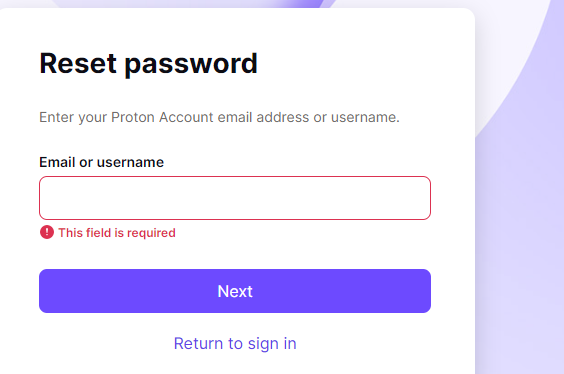
Step 1: Go to the ProtonVPN login page and click on the “Forgot password?” link.

Step 2: You’ll be asked to enter your username or email address associated with your ProtonVPN account. Fill in the required field and hit “Reset password.”

Step 3: You should receive an email from ProtonVPN with a password reset link. If you can’t find it, check your spam or junk mail folder.

Step 4: Click on the link and follow the instructions to create a new password. Try to make it strong and unique to keep your account secure.

Step 5: After resetting your password, head back to the ProtonVPN login page and try logging in with your new password.


Method 5: Dealing with Network Connectivity Issues

If your internet connection is unstable or slow, you might have trouble logging into ProtonVPN.

Try turning off your router for a few minutes and turning it back on again to see if your internet connection resumes back to normal speed.

Alternatively, you can call up your Internet Service Provider (ISPs) and enquire about the connection speed.


Method 6: VPN Service Provider Restrictions

Sometimes, certain restrictions from the VPN service provider might prevent you from logging in. These restrictions can occur due to policy violations, unpaid bills, or as part of standard security measures.

Ensure that your ISP or your country does not block or restrict the use of the VPN provider you are using.


Method 7: Dealing with an Outdated VPN Client

If your ProtonVPN client software is outdated, it may cause login issues. Updating to the latest version can fix bugs and improve functionality, making this an important step in troubleshooting your login problem.


Frequently Asked Questions (FAQ)

Q1. Why can’t I log into Proton VPN?

If you can’t log into ProtonVPN, there could be several reasons, such as an expired account or subscription, server overload, a firewall blocking the access, incorrect login credentials, network connectivity issues, service provider restrictions, or an outdated VPN client.

Refer to the methods mentioned above to troubleshoot these issues.

Q2. Is Proton VPN having problems today?

To check if ProtonVPN is experiencing problems today, visit the official ProtonVPN Twitter handle or their website. They usually post updates about any significant issues affecting users.

Q3. Why is my Proton VPN login temporarily disabled?

Your ProtonVPN login might be temporarily disabled due to multiple unsuccessful login attempts, potential security threats, or violation of their policies.

Check your email for any communication from ProtonVPN or reach out to their customer support for assistance.


Conclusion

Experiencing problems with ProtonVPN login can be frustrating, but most issues can be resolved easily with the right steps.

Whether it’s an expired subscription, firewall interference, incorrect login details, network connectivity problems, VPN service restrictions, or an outdated VPN client, each problem has a specific solution.

Remember, maintaining an up-to-date VPN client, a secure and stable network connection, and a clear understanding of your service provider’s policies can prevent most of these issues.

ProtonVPN is dedicated to providing secure, private, and unrestricted internet access, and their support team is always ready to help you when you encounter problems.


Can’t Log into ProtonVPN? [7 Ways to Troubleshoot & FIX It] Read More »

can-protonvpn-change-your-location

Can ProtonVPN Change My Location? [3 Ways to Test & Check]

So, you’ve been wondering, can ProtonVPN change my location?

It’s a question that pops up for many of us navigating the wild and often complicated world of VPNs (Virtual Private Networks).

You’re in the right place because we’re about to dive into this topic and help you make sense of it all.


Quick Answer

Yes, ProtonVPN can indeed change your location. It achieves this by routing your internet traffic through a server in a different location, which masks your real IP address.

This process, also known as IP masking or geo-spoofing, makes it seem as if you’re browsing from the server’s location, not your actual one.

This can be particularly useful when accessing location-specific content, maintaining online privacy, or exploring the global digital space without geographical restrictions.

Remember, your IP address changes each time you connect to a different server on the VPN.


What is ProtonVPN?

Let’s dive a little deeper. ProtonVPN is a popular VPN service known for its strong focus on privacy and security. It was developed by the same team that created ProtonMail, one of the world’s largest encrypted email services.

Essentially, a VPN like ProtonVPN creates a secure, encrypted “tunnel” between your device and the internet. It does this by routing your traffic through one of its servers located across the globe.

As a result, your IP address—the unique identifier that reveals your general geographic location—changes to match the server’s location.

This is like moving houses, but in the digital world. Your device’s apparent location shifts each time you connect to a different VPN server.

So, yes, ProtonVPN can change your location—at least, as far as the internet is concerned.

Does ProtonVPN change your IP address? Absolutely! It assigns you an IP address that matches the server you’re connected to.


How Does ProtonVPN Change Your Location?

If you’re like many internet users, you’ve asked the question, “Can you set a VPN to a specific location?” The answer is a resounding yes!

Here’s how ProtonVPN helps you change your digital location:

  • Choose Your Server: ProtonVPN allows you to select a server from various locations around the world. The server you choose will determine your new virtual location.
  • Mask Your IP: When you connect to a ProtonVPN server, your real IP address is masked, and you’re assigned an IP address linked to the server’s location.
  • Enjoy New Digital Location: After connection, any website or online service you access will view your location as being the same as the VPN server you’re connected to. This can unlock geo-restricted content, such as specific Netflix libraries, YouTube videos, or even some online shopping deals.

Wondering how often does VPN change IP address?

Your IP address will change each time you switch servers on ProtonVPN. If you stick with the same server, your IP address will remain the same.


Benefits of Changing Your Location with ProtonVPN

Changing your digital location through ProtonVPN isn’t just about fooling the internet about your whereabouts; it offers some serious benefits:

  • Unrestricted Access to Content: With ProtonVPN, you can bypass geographical restrictions and access content that might not be available in your actual location. This includes movies, music, and streaming content that is region-specific.
  • Increased Privacy: Changing your location also increases your privacy online. It makes it harder for third parties to track your internet activity and collect data about your browsing habits.
  • Better Security: ProtonVPN uses strong encryption to secure your data, which can be particularly useful when you’re using public Wi-Fi networks. This encryption keeps your information safe from hackers and other prying eyes.
  • Avoidance of Price Discrimination: Online services often vary their prices based on location. By changing your location, you might find better deals on flights, hotel bookings, or even software subscriptions.

Step-By-Step Guide: How to Change Your Location with ProtonVPN

Alright, now that we’ve covered the basics, let’s get to the heart of the matter: how to use ProtonVPN to change your location.

Here’s a step-by-step guide to get you started:

  • Install and Set Up ProtonVPN: If you haven’t already, download and install the ProtonVPN application on your device. You can create an account and sign in from there.
  • Choose a Server: Open the ProtonVPN application and browse through the list of servers. Each server represents a different location, so select one that matches where you want your new digital location to be.
  • Connect: Once you’ve chosen your server, hit the connect button. Your traffic will now be routed through the selected server, making it appear as if you’re accessing the internet from that location.
  • Verify: You can check if your location has been successfully changed by using online tools that display your IP address and location. More on this in the following sections.

How to Verify and Test If ProtonVPN Had Changed your Location

Here are the three (3) ways to check;


Method 1: Verify Your Location Change with IP Lookup

An IP lookup tool is one of the most reliable ways to confirm that ProtonVPN has changed your location. Here’s how you can do this:

  1. Before connecting to ProtonVPN, visit an IP lookup site like iplocation.net. Take note of your current IP address and location.
  2. Connect to ProtonVPN and select a server in your desired location.
  3. Revisit the IP lookup site. Your IP address and location should now reflect the location of the server you’re connected to.

If your new IP and location match the ProtonVPN server’s location, then you’re successfully geo-spoofing!


Method 2: Check Your Location Change with a Geo-Restricted Website

Another way to verify if ProtonVPN has changed your location is by accessing a geo-restricted website or service. Here’s how to go about it:

  • Choose a geo-restricted website or service: Find a website or service that is only available in the location you’re changing your IP to. For example, if you’re changing your location to the UK, you could use BBC iPlayer, which is only available to UK residents.
  • Try to access the service without ProtonVPN: Before connecting to ProtonVPN, attempt to access the site. It should tell you that the content is not available in your location.
  • Connect to ProtonVPN: Now, connect to a server in the location where the content is available using ProtonVPN.
  • Try to access the service again: Go back to the site or service and try to access the content again. If you can now access it, this confirms that ProtonVPN has successfully changed your location.

Method 3: Verify Your Location Change with Google Maps

Our last method involves using Google Maps. While it may not be as accurate as the previous two methods, it can still give you a general idea of your apparent location. Here’s how you can do it:

  • Clear your browser cache: Before you start, make sure to clear your browser cache. This is important as Google Maps can use cached data to remember your previous location.
  • Connect to ProtonVPN: Choose a server in your desired location and connect to it using ProtonVPN.
  • Open Google Maps: Navigate to Google Maps in your web browser. Google Maps should display a location based on your IP address.
  • Check the displayed location: Compare the location on Google Maps with the server location you chose in ProtonVPN. If they match, your location change has been successful!

Frequently Asked Questions (FAQ)

Q1: Does ProtonVPN change your IP address?

A: Absolutely! When you connect to a ProtonVPN server, your real IP address is replaced with an IP address from the server location. This effectively changes your digital location.

Q2: Can you set a VPN to a specific location?

A: Yes, ProtonVPN allows you to choose from a wide range of server locations. Simply select a server in the location you want, and ProtonVPN will make it appear as though you’re browsing from that location.

Q3: How often does VPN change IP address?

A: Your IP address changes each time you connect to a different server on ProtonVPN. If you disconnect and reconnect to the same server, you’ll usually be assigned the same IP address.

Q4: Can ProtonVPN bypass geographical restrictions?

A: Yes! Changing your IP address to one in a different location can help you bypass geographical restrictions on certain content, like region-specific video streams.

Q5: Can using ProtonVPN slow down my internet speed?

A: Sometimes, using a VPN can slightly decrease your internet speed due to encryption processes. However, if you’re experiencing significant slowdowns, our guide on how to speed up slow ProtonVPN might help.


Conclusion

And there you have it! Changing your location with ProtonVPN is a straightforward process. Choosing a server in a different location can fool the internet into thinking you’re somewhere else.

This can open up a world of unrestricted content, increased online privacy, better security, and potential savings from price discrimination.

Don’t forget to verify your new location using the methods we’ve covered. Each one offers a reliable way to ensure that ProtonVPN is doing its job.

But remember, if you ever run into issues, we’ve got a wealth of resources available, like our guides on how to fix ProtonVPN stuck on initializing connection.


Can ProtonVPN Change My Location? [3 Ways to Test & Check] Read More »

protonvpn-netflix

7 Methods to FIX ProtonVPN Netflix Not Working Error

Today, we will navigate the seas of Netflix streaming with ProtonVPN.

ProtonVPN has quite the reputation for offering us a pathway to our favorite Netflix shows, irrespective of where we’re located.

For example, when you connect to a Canada VPN server, you will log into Netflix from a Canada IP address (assigned to you by ProtonVPN) and you can view geo-restricted content based on this location.

In other ways, generally, you get more content if you are connecting to Netflix from the US, Canada, and the UK locations.

However, sometimes we may encounter the sudden error message of Netflix not working.

This error is often due to using a VPN like ProtonVPN, on Netflix accounts and can be resolved quickly using the different ways stated in this blog post.


Understanding Why ProtonVPN May Not Work with Netflix

So, why does this issue of ProtonVPN not working with Netflix occur in the first place? Netflix has a sophisticated system to detect and block VPNs’ IP addresses.

This is because of content licensing agreements that limit which content can be shown in which countries.

The good news is that not all VPN servers are blocked, and ProtonVPN constantly works on keeping its servers accessible for Netflix.

In certain cases, Netflix may even block a range of IP addresses that belong to a particular VPN service, including ProtonVPN.

And while ProtonVPN regularly adds new servers, it’s sometimes hard to keep up with Netflix’s blockade.

Your personal network settings or your device’s software can also interfere with ProtonVPN’s operation. But don’t worry, we’ve covered you with multiple methods to get you back to your shows.


How to Fix ProtonVPN Netflix Not Working Error

Here are the seven (7) methods you can use to troubleshoot the problem;


Method 1: Changing Your VPN Server

When ProtonVPN Netflix not working, one of the most effective solutions is to switch your VPN server.

As mentioned, Netflix aggressively blocks IP addresses associated with VPNs, including those of ProtonVPN. Luckily, ProtonVPN offers a vast pool of servers, and some will likely be unblocked. Here’s how you can do it:

  • Disconnect from your current ProtonVPN server.
  • Open the ProtonVPN app, then go to the ‘Countries’ tab.
  • Here, you’ll see a list of available servers. Select a different one than you were previously connected to.
  • Connect to the new server and try accessing Netflix again.

Method 2: Clearing Browser Cache and Cookies

If the problem is still not resolved, the culprit might be your browser’s cache and cookies.

Cached data and cookies can cause issues with the VPN, leading to the ProtonVPN Netflix not working error. So, let’s go through the steps to clear your browser cache and cookies:

For Google Chrome:

  1. Click on the three dots at the top right corner of the browser, then select ‘Settings’.
  2. Scroll down to ‘Privacy and Security’, then click on ‘Clear browsing data’.
  3. Select ‘Cached images and files’ and ‘Cookies and other site data’, then click ‘Clear data’.

For Firefox:

  1. Click on the three lines at the top right corner of the browser, then select ‘Options’.
  2. On the left side menu, select ‘Privacy & Security’.
  3. Under ‘Cookies and Site Data’, click on ‘Clear Data’.
  4. Select ‘Cookies and Site Data’ and ‘Cached Web Content’, then click ‘Clear’.

For Safari:

  1. Click on ‘Safari’ in the menu bar, then select ‘Preferences’.
  2. Click on the ‘Privacy’ tab, then ‘Manage Website Data’.
  3. Click ‘Remove All’, then ‘Remove Now’ to confirm.

Method 3: Using ProtonVPN’s Secure Core Servers

If you’re still encountering the ProtonVPN Netflix not working issue, using ProtonVPN’s Secure Core servers could be the solution.

Secure Core servers add an extra layer of protection by routing your connection through multiple servers before it reaches the final destination.

This makes it harder for Netflix to detect and block the VPN.

Here’s how you can use ProtonVPN’s Secure Core servers:

  1. Open the ProtonVPN app.
  2. Click on the toggle switch next to ‘Secure Core’ to turn it on.
  3. Now, connect to a server in a country where Netflix is available.

Do note that Secure Core is only available on ProtonVPN Plus and Visionary plans. Also, you might experience a slightly slower connection speed because your connection is routed through multiple servers.


Method 4: Disabling IPv6 on Your Router

Sometimes, IPv6 can cause connection problems with VPNs, leading to the ProtonVPN Netflix not working issue. While ProtonVPN supports IPv6, it may not work as well with all routers.

As a workaround, you can disable IPv6 on your router. Here’s how you can do this:

  1. Open a web browser and enter your router’s IP address into the address bar. Common IP addresses are ‘192.168.0.1’ or ‘192.168.1.1’.
  2. Login to your router’s admin panel. If you’re not sure about the credentials, try looking for them in the manual of your router, or consult your internet service provider.
  3. Navigate to the settings page where you can disable IPv6. This will vary depending on your router’s manufacturer and model.
  4. Look for an option labeled ‘IPv6’ and disable it.
  5. Save the changes and restart your router for the changes to take effect.

Please note that the steps might vary based on your router’s model and manufacturer. Refer to your router’s manual or manufacturer’s support for exact instructions.


Method 5: Updating ProtonVPN

Sticking to older versions of applications can sometimes make us stumble upon unexpected bugs. One of them could be the ProtonVPN Netflix not working problem.

If you’re still having trouble, check if you’re using the latest version of ProtonVPN. Developers regularly update apps to fix bugs and improve functionality, so using an outdated version could be the reason for your issue.


Method 6: Checking Your Internet Connection

If changing servers didn’t work, we might need to take a step back. Let’s focus on your internet connection. VPNs require a stable connection to function optimally.

An unstable or slow connection can cause issues, even leading to ProtonVPN Netflix not working. Here’s how you can troubleshoot your internet connection:

  1. Disconnect from the VPN and try accessing a website or service that you regularly use. If you can’t connect or if the connection is slow, the problem may lie with your internet.
  2. Restart your router or modem. This simple action can solve many connection issues.
  3. Check if your internet service provider is having any known issues. They often post service updates on their websites.
  4. If possible, try a different network. Connect to a mobile hotspot and see if the VPN works on that connection.

Method 7: Reinstalling ProtonVPN

If updating didn’t do the trick, the next step could be reinstalling ProtonVPN.

Corrupted files or installation errors can sometimes cause the app to malfunction, leading to the ProtonVPN Netflix not working issue.


Additional Tips to Improve ProtonVPN Netflix Experience

Even after troubleshooting, there are ways you can optimize your ProtonVPN Netflix experience. Here are a few additional tips to improve your viewing:

1. Choose the Right Server: Always choose a server closest to your location, as it can provide better speed and lower latency.

2. Use a Wired Connection: Use a wired connection instead of Wi-Fi if possible. Wired connections usually provide more stable and faster internet speeds, improving your streaming experience.

3. Check Bandwidth-Intensive Applications: Ensure no other bandwidth-intensive applications are running in the background, such as downloads, uploads, or other streaming services. These can slow down your VPN connection and affect your Netflix streaming.

4. Close Unnecessary Tabs: Keep your browser light by closing unnecessary tabs. This can help your device run smoother.

5. Contact ProtonVPN Support: If none of the above solutions work, don’t hesitate to contact ProtonVPN’s customer support. They are always ready to help with technical issues.


Frequently Asked Questions (FAQ)

Q1. Why is Netflix not working with my ProtonVPN?

Netflix may not work with your ProtonVPN due to various reasons like outdated ProtonVPN app, server issues, cache and cookies in your browser, or the use of IPv6. Follow the methods outlined in this blog to troubleshoot and resolve the issue.

Q2. Has Netflix blocked ProtonVPN?

To comply with its regional licensing agreements, Netflix attempts to block all VPNs, including ProtonVPN. However, ProtonVPN has successfully bypassed these blocks and provided access to Netflix in different regions.

Q3. Why can’t I access certain Netflix shows with my ProtonVPN?

The availability of Netflix shows varies by geographic location. While ProtonVPN can help you access different Netflix libraries, it can’t guarantee the availability of specific shows due to Netflix’s changing library and licensing agreements.

Q4. Can using ProtonVPN’s Secure Core servers improve my Netflix experience?

Yes, using ProtonVPN’s Secure Core servers can improve your Netflix experience as they add an extra layer of security by routing your connection through multiple servers, making it harder for Netflix to detect and block your VPN.

Q5. Is it legal to use ProtonVPN for Netflix?

Yes, using a VPN for Netflix in most countries is legal. However, it’s against Netflix’s terms of service, and they may block VPN IP addresses.


Conclusion

Navigating the ProtonVPN Netflix not working issue can be a bit daunting, but the solutions provided here should help you get back to your favorite shows and movies in no time.

Whether it’s changing servers, updating the app, disabling IPv6 on your router, or clearing your browser cache, there are multiple ways to ensure an uninterrupted Netflix experience with ProtonVPN.

Remember, sometimes these fixes might not work because of factors beyond your control, such as Netflix’s vigilant VPN-blocking tactics.

If you’ve tried all these methods and still can’t connect, consider contacting ProtonVPN’s customer support for more assistance.


7 Methods to FIX ProtonVPN Netflix Not Working Error Read More »