admin

download-online-streaming-videos

21 BEST Sites To Download Online Streaming Videos From Websites

Whether it’s a funny clip, a documentary, a workout session, or an educational tutorial, sometimes you just want to download that video and watch it later — without buffering or worrying it’ll vanish.

There are plenty of sites that let you download streaming videos from websites. Some work straight from your browser, while others give you more control with desktop apps or extensions. But here’s the catch — not all of them are safe or fast.

That’s why I went the extra mile to hand-pick 21 of the best websites that actually get the job done — cleanly, clearly, and with minimum hassle.

Whether you’re downloading from YouTube, Facebook, Vimeo, or a more obscure random website, this guide has got you covered.


If you’re in a hurry and just want the best of the best, these three sites are where you should start. They’re fast, reliable, and support a wide range of platforms — from YouTube and TikTok to lesser-known video sites.

3 FREE Sites To Use NOW

1. SaveFrom.net

Why it’s great:
This one’s a long-time favorite for a reason — super easy to use. Just paste a link and boom, you’re downloading in seconds. It supports YouTube, Facebook, Vimeo, and more.

Best part? It even has a browser extension for faster access. The only downside is that some features are limited unless you use their helper app — but for most users, the basic version works just fine.

2. Y2Mate

Why it’s great:
Y2Mate is all about speed and simplicity. No login needed, no weird pop-ups — just paste your link and download in various formats including MP4, MP3, and even 1080p HD when available.

It also works well with YouTube playlists, which not every site handles smoothly.

3. SnapSave.io

Why it’s great:
If you’re looking for crystal-clear video quality, SnapSave delivers. It supports 4K and HD downloads, especially from Facebook and YouTube.

What sets it apart is how clean and fast the interface is. No bloated ads, no sketchy redirects — just a smooth experience.

3 BEST PAID Sites You Can Use NOW

1. HitPaw

HitPaw is a feature-rich video downloader and converter that supports a huge range of platforms — from YouTube and TikTok to Instagram and Facebook. It’s perfect for anyone who wants to download in HD or 4K, trim videos, or convert to MP3 in just a few clicks.

2. 4K Video Downloader

This one’s a favorite for people who want maximum video quality. You can download entire playlists, subtitles, and even full channels — all the way up to 8K resolution. It’s clean, powerful, and works on Windows, Mac, and Linux.

3. ByClick Downloader

ByClick is incredibly easy to use — just copy a video link and it auto-detects it for download. It’s ideal for bulk downloading from sites like YouTube, Facebook, and Vimeo. You can also choose from MP4, MP3, AVI, and more.


What to Look for in an Online Video‑Downloader Site

✔️ Website Compatibility

A great downloader should support more than just YouTube. Think Facebook, Twitter, Instagram, Dailymotion, Vimeo, and other niche video platforms. The more sites it works with, the more useful it becomes.

✔️ Format & Quality Options

At the very least, you want to be able to save in MP4 (most universal format). Some tools also offer WEBM, 3GP, or even audio-only MP3 downloads. Bonus points if you can choose between 720p, 1080p, or 4K.

✔️ Speed

Waiting 3 minutes for a 1-minute clip? Nah. A good tool will analyze and prepare the download quickly, without you needing to refresh five times.

✔️ Free to Use (with optional upgrades)

Most people are fine with basic downloads. Some sites have premium versions for faster speed or higher-quality output, but a solid free tier is a must.


The 21 Best Sites to Download Online Streaming Videos From Any Websites [FREE & PAID]

1. SaveFrom.net (https://en.savefrom.net)

This long‑standing online video downloader makes things as simple as pasting a URL and picking your format. According to one list of free online URL video downloaders, SaveFrom.net is especially praised for its broad support across websites like YouTube, Vimeo, Hotstar and more.

What I like: it supports multiple formats and even has a browser extension so you don’t always have to manually paste links. What to watch out for: it does display ads, and sometimes full 4K quality isn’t available.

2. Y2Mate (https://www.y2mate.com)

Y2Mate is one of the most popular tools out there, and for good reason. It supports a wide range of sites like YouTube, Dailymotion, Facebook, and more — all with zero account needed. You can download videos in various formats like MP4, 3GP, and even extract MP3 audio.

It’s fast, clean, and ideal for people who just want a no-frills experience. However, because of its popularity, you might see a few ads — just avoid clicking on anything that looks suspicious.

3. SnapSave.io (https://snapsave.io)

SnapSave stands out for its high-definition quality options, including 1080p, 2K, and even 4K. It’s particularly powerful for downloading Facebook videos, but also works smoothly with YouTube and several other platforms.

The interface is modern and ad-light, which is a huge plus. There’s no app required, and downloads are typically fast, even for large files. Just paste the link, choose your quality, and you’re good to go.

4. ByClick Downloader (https://www.byclickdownloader.com)

ByClick Downloader is a desktop app for Windows that goes beyond just online tools. It supports YouTube playlists, channels, Facebook videos, Vimeo, and over 40 other platforms. It’s especially great if you want to download bulk videos or full playlists.

While it’s not entirely browser-based, it gives you more flexibility with download formats (MP4, MP3, AVI, etc.) and even lets you auto-detect videos from your browser. There’s a free version, but the premium upgrade ($4.99 USD) unlocks higher speeds and unlimited features.

5. KeepVid (https://keepvid.pro)

KeepVid has been around for years and is known for being one of the most stable and consistent tools. The online version supports a decent range of platforms like YouTube, Instagram, TikTok, and Twitch.

What’s great? There’s no software to install, and it supports resolutions up to 1080p. While the classic KeepVid.net was discontinued, KeepVid Pro has filled the gap with reliable performance — just be mindful of redirect ads.

6. 4K Video Downloader (https://www.4kdownload.com/products/product-videodownloader)

If you’re all about video quality, this tool is for you. 4K Video Downloader is a downloadable desktop app for Windows, Mac, and Linux. It lets you save videos in up to 8K resolution, supports entire playlists and channels, and even offers subtitle downloads.

It works with all major platforms — YouTube, TikTok, Facebook, and more. It’s not a web app, but it’s perfect for power users who want advanced features. The free plan is solid, and the premium version starts at $15 USD for lifetime access.

7. VidMate (https://www.vidmateapp.com)

VidMate is an Android app that lets users download streaming videos directly to their phone. It supports hundreds of platforms including YouTube, Facebook, DailyMotion, Instagram, and more. It’s especially popular in regions where mobile-first usage is the norm.

You won’t find it in the Google Play Store, so you’ll need to download it via the official website or other trusted sources. Despite that, it’s lightweight, easy to navigate, and supports both video and audio formats like MP4 and MP3.

8. TubeOffline (https://www.tubeoffline.com)

TubeOffline is a simple, old-school online video downloader that supports a wide variety of sites — over 100, actually — including some lesser-known platforms. It’s perfect if you’re trying to grab content from a site that other downloaders ignore.

The layout is very basic and ad-heavy, but don’t let that fool you. It gets the job done, and lets you convert videos into multiple formats like AVI, FLV, and MP4. Just be sure to avoid any pop-ups while using it.

9. YooDownload (https://www.yoodownload.com)

YooDownload is a web-based downloader that offers one of the cleanest and ad-free experiences. It’s best for downloading YouTube and Vimeo content, and also supports audio extraction.

What makes it shine is the fast download speed and no unnecessary redirects. You simply paste a URL, choose your file type, and hit download — no bells and whistles, just smooth functionality.

10. ClipConverter.cc (https://www.clipconverter.cc)

ClipConverter.cc is a reliable tool that supports both video and audio conversion. It’s compatible with popular sites like YouTube, Vimeo, Facebook, and more. You can choose from formats like MP4, AVI, MOV, and MP3 — all within a few clicks.

One standout feature is the ability to manually select resolution and bitrate, which is great if you’re trying to save space or optimize for specific devices. Ads can be a bit annoying, but the tool itself is fast and effective.

11. Video Grabber (https://www.videograbber.net)

Video Grabber works as both a web tool and a desktop app. It supports a wide range of websites including YouTube, TikTok, and Dailymotion. It can also record your screen and edit downloaded videos.

What’s neat is the auto-detect feature that works in the background if you’re using the app. It’s perfect for those who want more than just downloading — like trimming or converting the final file afterward.

12. FBdown.net (https://fbdown.net)

As the name suggests, FBdown is specifically built for Facebook video downloads — and it does that one job extremely well. Whether it’s a private video, a live stream, or a public post, you just paste the link, and it grabs it in standard or HD quality.

It also has a Chrome extension, which is super convenient if you download Facebook videos often. Just note: it doesn’t work with YouTube or other platforms.

13. Catch.Tube (https://catch.tube)

Catch.Tube is a straightforward, browser-based downloader that supports a ton of platforms — from YouTube and Facebook to TED, Vlive, and more. It works by grabbing the direct video stream from the page once you enter the URL.

There’s also a handy browser extension for Chrome and Firefox, which makes it even faster to grab videos on the fly. No account needed, no spammy pop-ups — just a clean and easy experience.

14. FastestTube (https://kwizzu.com/fastesttube)

FastestTube is actually a browser extension, not a web app, and it’s one of the oldest and most lightweight YouTube downloaders out there. Once installed, it adds a download button right under the YouTube video you’re watching.

It supports MP4 and FLV formats and lets you pick from several resolution options, including HD. It works on Chrome, Firefox, Safari, and Opera — but doesn’t support other platforms outside YouTube.

15. SSYouTube (https://ssyoutube.com)

This tool is basically a shortcut version of SaveFrom.net. All you do is add “ss” in front of any YouTube URL (like ssyoutube.com/watch?v=XYZ) and it takes you directly to a download page.

It’s fast, clean, and perfect if you’re on YouTube a lot. It doesn’t support other websites, but for quick YouTube grabs, it’s a real time-saver.

16. OnlineVideoConverter (https://www.onlinevideoconverter.com)

OnlineVideoConverter is a popular web-based tool that supports a wide range of input formats and video platforms. You can convert videos to MP4, MOV, FLV, or MP3, and it works on both desktop and mobile browsers.

It’s fast, free, and doesn’t require any sign-up. However, due to copyright enforcement, it no longer supports YouTube — so it’s best used for other streaming platforms like Vimeo or Dailymotion.

17. YT5s (https://yt5s.io)

YT5s is another clean, no-frills YouTube downloader that supports multiple resolutions, including 720p, 1080p, 2K, and even 4K. It also offers MP3 audio extraction, making it a great tool for music lovers.

Downloads are quick, and the interface is beginner-friendly. It also provides a QR code for transferring the file straight to your phone, which is a nice touch.

18. Flvto (https://www.flvto.biz)

Flvto specializes in converting YouTube videos to MP3 and MP4, but it also works with other video platforms. The interface is basic, but the conversion engine is surprisingly powerful and works well for grabbing music or podcasts.

There’s also a downloadable version if you prefer a desktop app. Just watch out for excessive pop-up ads — they’re the biggest downside to an otherwise solid tool.

19. Viddly (https://www.viddly.net)

Viddly is a lightweight Windows app that’s ideal for downloading entire playlists, channels, or single videos from YouTube. It supports 4K and 8K resolution, subtitle downloads, and even batch conversion to MP3 or other formats.

The interface is slick and easy to use. There’s a free version with solid features, and a Pro upgrade ($17.99 USD one-time) if you need advanced tools like auto-conversion and unlimited downloads.

20. HitPaw Video Converter (https://www.hitpaw.com/video-converter.html)

HitPaw offers more than just downloads — it’s a full-blown video conversion tool. But when it comes to pulling streaming videos from YouTube, TikTok, Facebook, and other sites, it performs like a champ.

The app works on both Windows and Mac, with high-speed batch downloads and conversion to just about any format you can think of. While it’s a desktop tool, it’s user-friendly and great for content creators or power users.

21. SaveTheVideo (https://www.savethevideo.com)

SaveTheVideo is a solid browser-based downloader that supports over 1,000 websites, including Reddit, Twitter, SoundCloud, and even news sites. You can convert to various formats and trim videos before downloading.

What sets it apart is its modern interface and focus on privacy — it doesn’t store your downloads or track usage. It’s a go-to if you want more than just basic downloads with a touch of control over the final file.


Frequently Asked Questions (FAQ)

Let’s quickly tackle some of the most common questions people have when it comes to downloading streaming videos.

Q1. How do I download a video from a website that doesn’t allow it?

You’ll need a more advanced tool — like 4K Video Downloader, Video Grabber, or a screen recorder. These tools can pull video even when the site tries to block it. That said, always check if it’s legal to download from that specific platform.

Q2. How to unlock blocked videos?

Sometimes videos are region-locked or restricted by content filters. Using a VPN can help you bypass geo-blocks. Also, some downloaders like SaveTheVideo or Catch.Tube work well with proxy settings built-in.

Q3. How to rip from streaming services?

If you’re talking about platforms like Netflix, Hulu, or Disney+, downloading with third-party tools is against their terms and could be illegal. The best practice is to use their built-in offline download features, available in their apps.

Q4. Can I save a streaming video to my computer?

Yes, if the content is not DRM-protected and you’re using the right tool (like Y2Mate, SaveFrom.net, or SnapSave.io), you can easily download and save the video in formats like MP4 or WebM for offline viewing.

Conclusion

There you have it — 21 of the best websites to download streaming videos, plus everything you need to know to pick the right one for your needs.

Whether you’re grabbing a quick YouTube tutorial, saving a Facebook live stream, or downloading a full playlist in HD, there’s a tool on this list that’ll get the job done — fast, clean, and (mostly) free.

Just remember: not every site plays nice with every platform, so it’s worth keeping a couple of these tools bookmarked as your go-to toolkit.


21 BEST Sites To Download Online Streaming Videos From Websites Read More »
google-maps-fuel-efficient-route-blogpost-featured-image

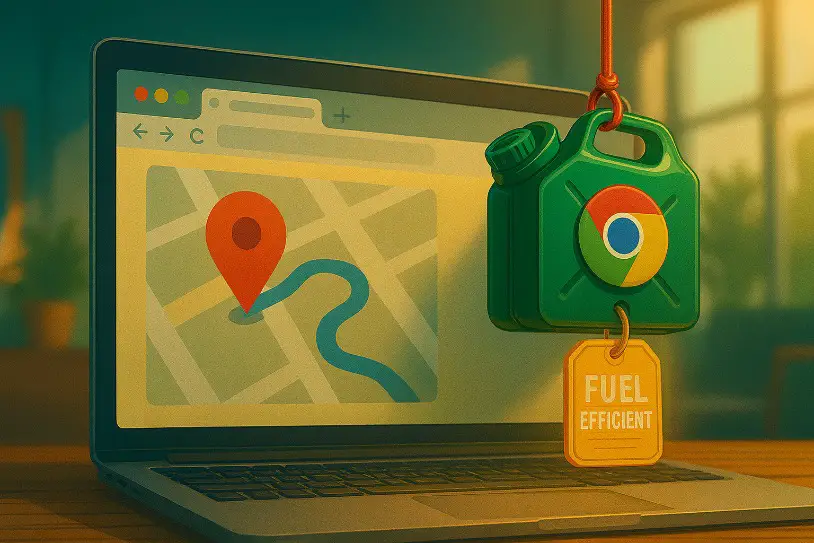
Why Google Maps Arrive Later When Choosing Fuel-Efficient Routes

If you’ve ever tapped fuel-efficient route on Google Maps hoping to save some gas money, only to show up 15 minutes late, you’re not alone.

In this post, I’ll break down exactly how and why Google Maps prioritizes fuel efficiency over speed — and what that means for your ETA. We’ll also talk about when you should use the fuel-saving option… and when you’re better off skipping it altogether.


Quick Answer

Yes — fuel-efficient routes can make you arrive later.

Google Maps’ fuel-efficient routing prioritizes energy savings over speed. So yes — it can absolutely cause you to arrive later, sometimes by several minutes or more, depending on your route.

You’re not in a rush.

You drive a hybrid or electric vehicle
These types of vehicles perform best with smoother, stop-and-go traffic or slower speeds — which fuel-efficient routes often provide.

You want to reduce your carbon footprint
Every drop of fuel saved reduces emissions. If you’re environmentally conscious, these routes are aligned with your goals.

Gas prices are high
When fuel is expensive, saving even a few percent adds up. Choosing the green route can stretch your tank farther.

You’re on a tight schedule

You’re driving in unfamiliar areas
Fuel-efficient routes sometimes involve turns through neighborhoods or smaller roads, which can feel disorienting or risky in a new city.

The time difference is significant
If Google Maps shows “Fuel-efficient: 15 mins longer,” and it’s just a 30-minute drive, that’s a big jump. In these cases, speed wins.

You drive a fuel-efficient vehicle already
If your car is already optimized for great mileage (like a Toyota Prius or EV), the extra effort to save fuel may not be worth the detour.


How Google Maps’ “Fuel-Efficient Route” Feature Works

Google Maps rolled out its fuel-efficient routing system in 2021 with a mission: help drivers save money on gas and reduce emissions — all with just a different route. But how does it actually work?

Here’s what’s happening behind the scenes:

🌱 It uses advanced data + AI modeling

Google pulls in massive datasets — including information from the U.S. Department of Energy’s National Renewable Energy Laboratory (NREL) — to understand which types of routes consume more or less fuel. It analyzes things like:

  • Road incline (elevation changes)
  • Traffic flow and congestion
  • Speed limits and road types
  • Stop signs, traffic lights, and turns

🚗 It tailors results based on your car’s engine type

If you’ve set your vehicle preferences inside Google Maps, it can recommend routes based on whether you’re driving a gasoline, diesel, hybrid, or electric vehicle. Different engines are more efficient under different conditions, so your car type affects the suggestion.

📍 It doesn’t always pick the shortest OR the fastest

Unlike traditional navigation that’s laser-focused on time or distance, this feature zeroes in on fuel economy. That means:

  • You might take more turns to avoid stop-and-go traffic.
  • It may send you on slower roads instead of highways.
  • The total distance might even be a little longer — but you’ll burn less gas getting there.

The result? A route that helps reduce your carbon footprint and keeps more dollars in your fuel budget… even if it costs you a few extra minutes.


How to Enable Fuel Efficient Routes on Google Maps?

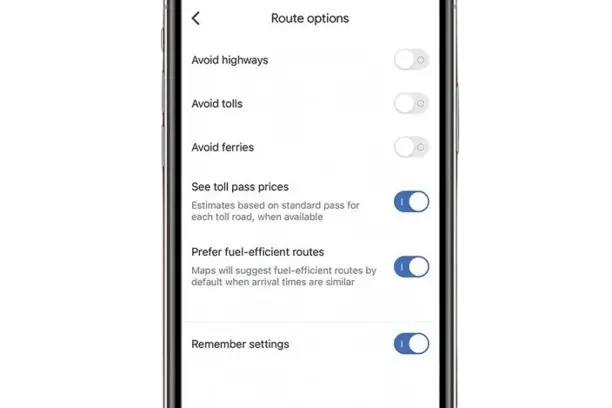
choosing to turn on or off the google maps fuel efficient route option

To enable fuel-efficient routing:

  1. Open Google Maps
  2. Go to Settings > Navigation Settings
  3. Tap Route options
  4. Enable “Prefer fuel-efficient routes”
    Google will then default to this route when available — and will let you compare with the fastest option before you start driving.

Why you might end up arriving later, even though you chose “Fuel-Efficient Route” in Google Maps

Choosing the fuel-efficient route doesn’t guarantee the quickest arrival. In fact, it often does the opposite.

Let’s break down exactly why:

1. It avoids high-speed roads

Fuel-efficient routes often steer you away from highways because high speeds — especially above 50 mph (80 km/h) — cause engines to burn more fuel. Even though highways get you there faster, they’re not always the most efficient in terms of gas usage.

2. It prioritizes steady driving

Fuel economy improves when you drive at consistent speeds. That’s why Google Maps may send you through local streets with fewer stop-and-go conditions or gradual curves — even if it adds miles or minutes.

3. Traffic patterns play a big role

Google analyzes real-time traffic data and historical congestion to figure out where you’ll waste fuel idling. A longer road with smoother flow might be suggested over a shorter one with heavier congestion.

4. Your vehicle type changes everything

For example, a hybrid car performs great in stop-and-go traffic due to regenerative braking. So your fuel-efficient route might include more city driving. A diesel engine? It might lean toward long, flat stretches. The algorithm adjusts based on that input.

5. Sometimes, it’s just a more complicated route

To save that 7% in fuel, the app might have you take a winding path that involves more turns, back roads, or intersections. And that can feel slower — because it usually is.

In conclusion, Google Maps isn’t making a mistake — it’s deliberately giving you a slower route because it believes it’s more efficient for your wallet and the planet. Whether that trade-off is worth it, is totally up to you.


Cost & Environmental Benefits

So, is it really worth it to take the longer way just to save a bit of fuel? For a lot of drivers — yep, it actually is. Even if it adds a few extra minutes to your trip, the long-term benefits can be surprisingly solid.

Let’s break it down.

💰 Fuel savings add up more than you think

Google Maps estimates that fuel-efficient routes can save you up to 30% in fuel, depending on your driving style, car type, and route. Even if the average is closer to 6%–10%, here’s how that plays out:

  • Assume you drive 15,000 miles a year
  • Your car gets 25 mpg (miles per gallon)
  • Gas costs $3.80 per gallon (USD)

You’d normally spend about $2,280/year on fuel.
A 10% savings could mean $228 back in your pocket — just by changing your route habits.

And that’s every year. Not bad for showing up 5 minutes later, right?

🌍 Environmental impact is real

Google Maps’ own data says fuel-efficient routes have already helped prevent over 1 million metric tons of carbon emissions. That’s like taking 200,000+ cars off the road for an entire year.

If you care about sustainability, these small daily choices — when multiplied across millions of users — make a massive global impact.

And if you’re driving an older, less efficient vehicle, the environmental benefit is even greater.

🧠 Bottom line:

  • If time isn’t critical, taking the eco-route makes sense.
  • You’ll save money on fuel, reduce wear on your car (less stop-and-go), and do your part for the environment.
  • But if you’re under time pressure or the detour is just too much, the fastest route is still there for you.

The best part? Google Maps lets you choose — every time.


Frequently Asked Questions

Q1. Why is Google Maps taking me on longer routes?

Google Maps might be prioritizing fuel savings, traffic conditions, or even road safety over speed. If you have fuel-efficient routing turned on, it will often suggest a longer route that uses less gas — even if it takes more time.

Q2. How to get Google Maps to show fastest route instead of fuel efficient every time?

Go to Google Maps Settings > Navigation Settings > Route Options, and turn off the setting that says “Prefer fuel-efficient routes.” Once off, Google will default to the fastest route whenever you get directions.

Q3. Will this feature work if I drive an EV (electric vehicle)?

Yes! Google Maps allows you to choose your vehicle type (gas, diesel, hybrid, or electric), and the routing suggestions will adjust based on that. EV drivers get routes that consider battery efficiency, not just fuel.

Q4. Why is there no time difference between the fuel-efficient and fastest route sometimes?

In some cases, the most fuel-efficient route is also the fastest — especially when traffic is low, roads are flat, and the speeds are consistent. When that happens, it’s a win-win!


Conclusion

Fuel-efficient routes on Google Maps are a clever blend of tech, traffic data, and environmental awareness — but they’re not without trade-offs.

Sure, they might add a few extra minutes to your trip, and yes, it can be a little annoying when your ETA keeps slipping behind schedule. But if your goal is to save on gas, reduce wear on your car, or simply lower your carbon footprint, the slight delay could be totally worth it.

The key is knowing when to use it.

Google gives you the power to choose: fastest route or fuel-saver. Neither is “wrong” — it just depends on your priorities that day.

So the next time Google Maps asks if you’d like to take the greener route, you’ll know exactly what you’re signing up for — and whether or not it’s the right move.


Why Google Maps Arrive Later When Choosing Fuel-Efficient Routes Read More »

passive-income-apps-pay-to-walk-jog-run

9 BEST APPS That PAY YOU To WALK & JOG (Passive Income)

We all know walking and running are some of the easiest ways to stay fit, but what if your daily steps could also pay you back?

Thanks to a wave of innovative fitness apps, you can now earn real rewards—like PayPal cash, Amazon gift cards, or even cryptocurrency—just by moving. It’s like turning your morning jog or grocery store walk into a side hustle.

In this post, I’ll share some of the best walking and running apps that not only keep you healthy but also put extra money in your pocket.


WeWard is a walking app that turns your daily steps into rewards. The idea is simple—the more you move, the more you earn. Users collect “Wards” (the app’s in-app currency) for walking, completing challenges, or checking out partner deals. These Wards can then be redeemed for gift cards, donations to charities, or even cash. It’s like getting a little paycheck just for staying active.

  • Supported devices: iOS and Android
  • Payment methods: PayPal, bank transfer (in some regions), Amazon and other retail gift cards, charity donations
  • Minimum payout: Around €15 (USD equivalent varies) before you can cash out via PayPal.
  • How it is calculated: You need 3,000 Wards for a $20 cash payout via PayPal or bank transfer (SEPA in Europe, but US/UK/Canada users stick with PayPal/Venmo). Smaller rewards like gift cards can start at fewer Wards, depending on the deal. 1,500 steps = 1 Ward, and you can earn up to 25 Wards daily by walking.

Start with 150 Wards directly into your Wards balance with this referral code: RusticPanther4560


Walk Tracker is a fitness app that helps you track your steps, calories burned, and distance covered while walking or running. What makes it interesting is that it doesn’t just log your movement—it also rewards your activity with points that can be turned into real-world perks. Think of it as a digital step counter that pays you back for staying consistent with your fitness goals.

  • Supported devices: iOS and Android
  • Payment methods: PayPal, Amazon Gift Cards, and other retail gift cards (varies by region)
  • Minimum payout: Usually starts around $10 USD before you can cash out
  • How it is calculated: You’ll need 5,000 points for a $5 cash payout via PayPal. Gift cards can start at lower point thresholds, depending on the retailer. Points are earned based on steps or challenges, with roughly 10,000 steps equaling 100 points on average.
  • Referral Code (if required): 3DZCsco

Sweatcoin is one of the most popular apps that pays you to walk. Every step you take outdoors is converted into “Sweatcoins,” a digital currency you can use to claim discounts, products, gift cards, or even donate to charity. Recently, the app also launched its own crypto token (SWEAT), giving users another way to benefit from their daily movement. The more you walk, the more you earn—it’s that simple.

  • Supported devices: iOS and Android
  • Payment methods: PayPal (through third-party offers), Amazon Gift Cards, retail discounts, charity donations, and crypto (SWEAT token)
  • Minimum payout: Depends on the reward; most gift cards and PayPal options start around $5–$10 USD worth of Sweatcoins
  • How it is calculated: You’ll need around 20,000 sweatcoins for a $50 PayPal payout, though offers vary. Smaller rewards like gift cards can start at 5,000 sweatcoins. 1,000 steps = 0.95 sweatcoins on the free plan, with a daily cap of 10 sweatcoins (about 10,000 steps).

Runtopia tracks your walking, running (and sometimes cycling) workouts and rewards them with virtual coins called SPC (Sports Coins). You earn SPC by hitting step goals, completing tasks, and participating in challenges. Then you can redeem SPC for PayPal cash, gift cards, sports gear, memberships, or discounts.

  • Supported devices: iOS (iPhone, iPad) and Android
  • Payment methods: PayPal cash, gift cards, sports & fitness products, and in-app rewards.
  • Minimum payout: It’s pretty steep. One review says you need ≈ 35,000 SPC to cash out via PayPal. That’s a lot of steps/time.
  • How it is calculated: You need 6,667 SPC for a $500 cash payout via PayPal, which is steep. Smaller rewards like gift cards start at lower SPC amounts. 10,000 steps earn about 5–10 SPC daily for free users, with premium plans boosting that to 100 SPC max.
  • Referral Code: QM7CST8YO3MF

Robox Fit is a “move to earn” app that rewards walking with crypto. You walk, track your steps, and earn ROX tokens. It also has Boosts (multipliers) so you can earn more if you upgrade. There’s a referral system too — invite friends, and you get bonuses from their activity.

  • Supported devices: iOS and Android
  • Payment methods: ROX tokens (withdrawals via NC Wallet for free, or to other Solana-based wallets with Boosts/subscription)
  • Minimum payout: As low as 0.02 ROX to NC Wallet
  • How it is calculated: The app recently lowered its minimum withdrawal to 500 ROX for crypto payouts, which you can transfer to a wallet. Exact cash value varies with ROX’s market price, but 10,000 steps typically earn 1–2 ROX on the free plan. Boosts can multiply that.

Walk Earn is a simple pedometer app that pays you for staying active. Every step you take is tracked and converted into in-app coins that can be redeemed for real rewards. The app is designed for people who want to make their daily walks a little more motivating while earning small perks along the way.

  • Supported devices: iOS and Android
  • Payment methods: PayPal cash, Amazon Gift Cards, and other retail gift cards
  • Minimum payout: Usually around $10 USD before you can withdraw
  • How it is calculated: You need 10,000 coins for a $5 PayPal payout, but the step-to-coin ratio isn’t clear, and some users report high thresholds or payout issues. Roughly 10,000 steps might earn 50–100 coins, depending on tasks or ads watched.

Footpath isn’t a “get paid to walk” app—it’s a route-planning and map-navigation tool aimed at outdoor lovers. With this app you draw routes with your finger, and it snaps your path to real roads, trails, or paths. You can measure distance, elevation, plan new running or walking adventures, and even get turn-by-turn voice navigation. It’s more about making your walks, runs, or hikes smarter—not profitable.

  • Supported devices: iOS (iPhone, iPad, Apple Watch, Mac with Apple Silicon), Android
  • Payment method: No direct payments from the app – PayPal or other platforms for selling routes or coaching services externally
  • Minimum payout (if any): No in-app payouts since earnings come from external hustles like coaching or route sales. No minimum step count—your income depends on how you market your routes (e.g., $5–$50 per custom route sold).

StepEarn is a “get-paid-to-walk” style app that tracks your steps automatically and rewards you with coins for daily walking. You can boost earnings by completing challenges or daily goals, and then convert those coins into real cash when you reach the payout threshold.

  • Supported devices: Android (via Google Play)
  • Payment methods: PayPal cash
  • Minimum payout: PayPal for cash – Gift cards (Amazon, Walmart, etc.) – In-app rewards like discounts or gadgetsMinimum Payout Amount You need 20,000 coins for a $10 PayPal payout, but the step-to-coin ratio varies, and ads or tasks boost earnings. Roughly 10,000 steps earn 50–100 coins daily, depending on your activity and engagement.

CashWalk is a fitness reward app that pays you for walking. You earn “coins” for every 100 steps, plus bonus coins from daily check-ins, scratch cards, referrals, and other small tasks. Then you use those coins to redeem gift cards from popular retailers. It’s less about big income, more about turning your movement into small perks.

  • Supported devices: iOS and Android
  • Payment method: Gift cards only (from places like Amazon, Starbucks, etc.)
  • Minimum payout: About $5 USD via gift card, which usually requires 5,000 coins
  • How it is calculated: You need 5,000 coins for a $5 gift card, with 1 coin earned per 100 steps, up to 100 coins daily (10,000 steps). You’ll hit that $5 mark in about 50 days if you max out daily steps.

9 BEST APPS That PAY YOU To WALK & JOG (Passive Income) Read More »

earn-passive-income-sharing-internet-unused-data-earn-money

9+ Proven Apps to Sell Your Unused Data & Earn Money [2025]

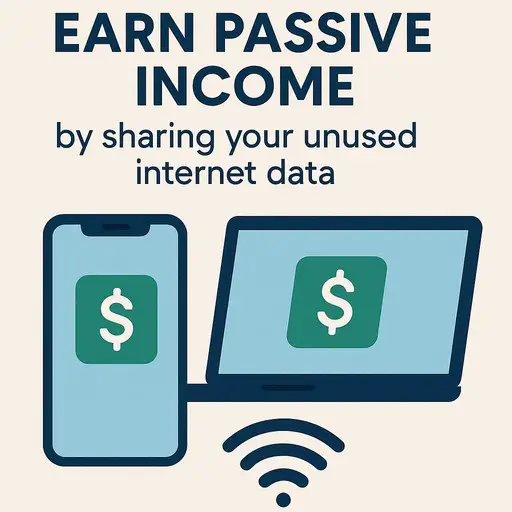
Ever feel like your internet connection is just sitting idle while you’re at work or asleep? What if you could turn that unused bandwidth into a steady stream of passive income?

A new wave of apps has emerged that allow you to do exactly that—get paid for sharing a small, safe portion of your home Wi-Fi or mobile data. It’s a simple way to make your internet plan work for you, earning a little extra cash with minimal effort.

In this guide, we’ll break down some of the top apps that let you earn by sharing your unused data. We’ve looked at the key details for each one: how you get paid, what devices they work on, and what the companies actually do with your shared connection. This will help you choose the right option to start earning on the side.


Pawns.app offers a straightforward approach to earning a little passive income by sharing your unused internet bandwidth. Much like others in this space, it works by running a small application on your devices that allows the company to use a portion of your internet connection for their global network. This network is used by businesses for market research and web data collection. The setup is simple, and once it’s running, it requires very little attention from you.

  • Minimum Payout: The minimum amount you need to cash out is $5.
  • Withdrawal Method & Device: You can withdraw your earnings via PayPal, Bitcoin, or direct bank transfer.
  • Platforms Supported: Pawns.app supports Android, Windows, and macOS. It is not available for iOS.
  • Other Ways to Earn: Beyond sharing your IP, Pawns.app provides several other ways to boost your earnings. You can complete paid online surveys, which are frequently offered based on your demographic profile.
  • Primary Use & Company Goal: The primary function of the app is to contribute to a pool of residential IP addresses. Companies use this network to gather public data from the internet for purposes like academic research, price comparison, and SEO monitoring. The company states that user privacy is a priority, ensuring that your personal data and browsing activity are not intercepted or monitored.

Honeygain is one of the most popular and straightforward apps out there for earning a bit of extra cash by sharing your unused internet data. The concept is simple: you install the app, it runs quietly in the background, and the company uses your internet connection as a tiny part of a larger web-scraping and market research network. They essentially pay you for your unused bandwidth, and you barely have to lift a finger after the initial setup.

  • Minimum Payout: The minimum amount you need to cash out is $20.
  • Withdrawal & Device: Withdrawals are processed via PayPal or JMPT cryptocurrency (which can be converted to USD).
  • Platforms Supported: You can install it on Android, iOS, Windows, and macOS.
  • Other Ways to Earn: Besides sharing data, you can get a $5 sign-up bonus to kickstart your earnings. They also occasionally run contests and offer extra credit for referring friends to the platform.
  • Primary Use & Company Goal: Honeygain’s primary use is to create a crowdsourced residential IP network. Companies use this network for things like price comparison aggregation, ad verification, and brand monitoring.
  • They need real, organic IP addresses from around the world to get accurate data, and that’s what you’re providing in exchange for a small fee. Your personal data and activity are not monitored; they are only interested in your IP’s location and the bandwidth itself.


Traffmonetizer is an application that allows you to generate passive income by sharing your unused internet bandwidth. The service is designed to be simple and hands-off. Once you install their lightweight application on a device, it runs in the background, and you earn money based on the amount of traffic that passes through your shared connection.

  • Minimum Payout: The minimum withdrawal amount is $10.
  • Withdrawal Method & Device: Earnings are paid out via PayPal, USDT (Tether cryptocurrency), or airtime/phone credit top-ups.
  • Platforms Supported: It is compatible with Windows, macOS, Linux, and Android.
  • Other Ways to Earn: The primary earning method is by sharing bandwidth. Traffmonetizer does not offer additional features like surveys or an offerwall.
  • Primary Use & Company Goal: The app’s main function is to contribute your IP address to a larger pool of residential proxies. This network is then used by businesses for legitimate purposes like web scraping, ad verification, and price comparison aggregation. The company states that all user data is anonymized and that your personal information and private internet activity are not accessed or logged.

RePocket is a platform that allows you to earn money by sharing your unused internet bandwidth. The app runs quietly in the background on your devices, and in exchange for contributing your resources, you get paid.

  • Minimum Payout: The minimum amount required to withdraw your earnings is $10.
  • Withdrawal Method & Device: You can cash out your earnings via PayPal or through various gift cards.
  • Platforms Supported: RePocket is supported on Android, Windows, macOS, and Linux. It is not available for iOS devices.
  • Other Ways to Earn: Besides sharing bandwidth, RePocket offers additional ways to earn. You can complete paid surveys and offers through their partner network.
  • Primary Use & Company Goal: The primary use of the app is to contribute your device’s resources to a larger network. This network is used by businesses for legitimate purposes like market research, ad verification, and data collection. The company states that user privacy is a priority, ensuring that your personal data and browsing activity are not accessed or monitored. They only use your IP address and a small amount of bandwidth.

PacketShare is an application that allows you to earn money by contributing your unused internet bandwidth to a global network. By installing their software on your devices, you enable businesses to utilize a small portion of your connection for tasks like data gathering and market research.

  • Minimum Payout: The minimum amount required to withdraw your earnings is $5.
  • Withdrawal Method & Device: Earnings are paid out via PayPal.
  • Platforms Supported: PacketShare is supported on Windows and macOS operating systems.
  • Other Ways to Earn: The primary method of earning is by sharing bandwidth. PacketShare does not prominently feature additional earning methods such as surveys or a referral program.
  • Primary Use & Company Goal: The primary use of the app is to contribute to a distributed network of residential IP addresses. Companies access this network for activities like web scraping, ad verification, and price comparison, as traffic from real homes is less likely to be blocked than traffic from data centers. The company states that user privacy is protected through encryption and that they do not monitor or collect personal browsing data.

Gener8 is a different kind of earning platform that focuses on your web browsing data. The core idea is that instead of big companies profiting from your online behavior without your consent, you can choose to share your anonymized browsing data with them and get rewarded for it.

You install their browser extension or use their custom browser, and it runs in the background as you surf the web, collecting data on general trends (not your personal info). In return, you earn points that can be traded in for various rewards. It’s a unique take on turning your everyday internet use into something more valuable.

  • Minimum Payout: Gener8 uses a points system called tokens. There isn’t a standard cash minimum; instead, you redeem your accumulated tokens for rewards. The cost of rewards varies, so the minimum needed depends on what you want to get.
  • Withdrawal Method & Device: Withdrawals are not cash payments. You redeem your tokens for rewards like gift cards (e.g., Amazon, Starbucks), donations to charity, or entries into prize draws. The platform is designed for use on a computer via a browser extension. They also have a mobile app for managing your account and rewards.
  • Platforms Supported: It works primarily as a browser extension for Chrome, Firefox, and Edge. They also offer a dedicated desktop browser for Windows and macOS, and a mobile app for Android and iOS for account management.
  • Other Ways to Earn: Besides sharing your browsing data, you can earn more tokens by completing offers and surveys through their partner network. They also have a referral program that rewards you for bringing new users to the platform.
  • Primary Use & Company Goal: The primary use is to create a large, ethical panel of user data for market research. Companies use this anonymized and aggregated data to understand consumer trends and improve their products and services. Gener8 emphasizes user privacy and control, ensuring that no personally identifiable information is ever sold or shared.

PacketStream is a platform that allows you to earn money by sharing your unused internet bandwidth. It works by installing a small application on your computer that runs in the background. This application lets the company use a portion of your internet connection to create a network of residential IP addresses.

Businesses use this network for tasks like ad verification and market research. Your personal data and browsing activity are not monitored; the company only uses your IP address and a small amount of bandwidth.

  • Minimum Payout: The minimum amount required to withdraw your earnings is $5.
  • Withdrawal Method & Device: You can cash out your earnings via PayPal. The application is designed to be installed on a computer running Windows or macOS. It is not available for mobile devices.
  • Platforms Supported: PacketStream is supported on Windows and macOS operating systems.
  • Other Ways to Earn: The primary way to earn is by sharing bandwidth. PacketStream does not prominently feature other methods like surveys or a referral program within its core offering.
  • Primary Use & Company Goal: The primary use of the app is to contribute to a global proxy network. Companies purchase access to this network to gather public web data from residential IP addresses for purposes like competitive analysis and SEO monitoring. The company emphasizes that user privacy is protected and that all usage is compliant with its terms of service.

EarnApp is a legit platform that lets you make a bit of extra cash by putting your unused internet bandwidth to work. Think of it like renting out a tiny, unused part of your internet connection. The app runs quietly in the background on your devices, and companies use it for things like market research, price comparison, and ad verification.

  • 💰 Minimum Payout: The minimum withdrawal amount is $2.50 for PayPal and Wise transfers. For Amazon gift cards, the minimum is $50.
  • 💸 Withdrawal Method & Device: You can withdraw your earnings via PayPal, Wise (transfer), or Amazon gift cards.
  • 📱 Platforms Supported: This is one of EarnApp’s biggest strengths. It supports Windows, macOS, Linux, Android, iOS, and Raspberry Pi 210.
  • 🎯 Other Ways to Earn: Besides sharing bandwidth, you can earn through their referral program and by completing tasks on the Offerwall. The Offerwall includes surveys, app installs, and other tasks from third-party partners.
  • 🏢 Primary Use & Company Goal: EarnApp’s primary use is to build a crowdsourced network of residential IP addresses. The company then sells access to this network to businesses and researchers who need to gather public web data ethically for tasks like competitive analysis, academic research, and brand protection.


Unlike traditional apps, Grass is a web-based extension, meaning you don’t need to download software; you simply add it to your browser and it runs while you browse the web normally. It is designed to be completely passive, requiring no active effort after installation.

  • Minimum Payout: Grass does not have a publicly stated minimum payout threshold. Earnings accumulate in points, which are expected to be convertible to rewards upon launch of their token.
  • Withdrawal Method & Device: Earnings are distributed in the form of cryptocurrency rewards, specifically their own token. It operates as a browser extension for Chrome, Firefox, and Brave.
  • Platforms Supported: Grass is supported as an extension on Chromium-based browsers like Chrome, Brave, and Edge, as well as Firefox. A dedicated mobile app is coming soon in late 2025.
  • Other Ways to Earn: The primary way to earn is by sharing bandwidth. Grass also offers a referral program that allows users to earn a bonus for bringing new users onto the network.
  • Primary Use & Company Goal: The primary use is to create a decentralized network of residential IPs that provides data for AI companies. This data is used to train large language models and other AI systems, helping them become more accurate and unbiased. The company emphasizes that user privacy is protected; it does not have access to personal data, browsing history, or any identifiable information. All data collected is anonymized and aggregated.

9+ Proven Apps to Sell Your Unused Data & Earn Money [2025] Read More »

eth-tokenization

How to Stake ETH Securely While Accessing RWA Tokenization Platforms

As Ethereum keeps evolving, it’s not just about DeFi protocols or meme coins anymore — it’s about bridging traditional finance with blockchain, and RWA tokenization is how we’re getting there.

But here’s the thing — none of this matters if your crypto isn’t stored and staked safely. That’s where hardware wallets like Ledger and Trezor come into play.

Whether you’re a passive staker looking to earn yield or a Web3 enthusiast exploring RWA platforms, choosing the right wallet can make or break your crypto journey.

If you’re in a hurry and just want the verdict—go with Ledger. Here’s why:

  • Ledger offers broader third-party staking integrations, making it easier to connect with RWA tokenization platforms like Centrifuge or Ondo Finance.
  • It supports Ledger Live, which simplifies ETH staking directly within its ecosystem, or via integration with Lido and Rocket Pool.
  • Security-wise, Ledger’s Secure Element chip adds another layer of protection for your staked ETH and any RWA tokens.

That said, Trezor is still a solid choice, especially if you prefer open-source firmware and transparency. It’s a bit more hands-on when setting up staking through third-party tools, but for privacy enthusiasts, it has its perks.

Before we compare wallets, let’s get on the same page about what Ethereum staking is — and why it’s a cornerstone for Real-World Asset (RWA) tokenization.

🪙 What Is Ethereum Staking?

In simple terms, Ethereum staking is the process of locking up your ETH to support the Ethereum network, now running on proof-of-stake. You earn staking rewards (like interest) in return. Instead of using power-hungry mining rigs, Ethereum now relies on validators — and you can become one or delegate your ETH through a staking provider.

🌎 How It Connects to RWA Tokenization

Now here’s where it gets interesting. RWA tokenization means turning real-world assets — think real estate, art, or even commodities — into digital tokens on the blockchain.

And Ethereum, being the biggest smart contract platform, is the go-to for building these tokenized asset systems. But these platforms often require a secure, staking-enabled environment to function properly. That means:

  • Having ETH to cover gas fees
  • Staking ETH to participate in governance or collateralization
  • Safely storing and interacting with RWA tokens

In short, Ethereum staking is like the fuel, and RWA platforms are the vehicle. Without the right wallet, though, you’re either not maximizing your rewards, or worse — risking your digital assets.

In short: Your wallet affects how much you earn, how safe your assets are, and what platforms you can access.

🔐 1. Security Is Everything

When staking ETH, you’re locking up real value — sometimes thousands of dollars worth. Hardware wallets like Ledger and Trezor keep your private keys offline, meaning even if someone hacks your browser or staking dApp, they can’t touch your funds.

🌐 2. Compatibility With RWA Platforms

Many tokenized RWA platforms like Centrifuge, Maple, or Goldfinch require wallet connections for:

  • Signing smart contracts
  • Receiving yield from real-world collateral
  • Participating in governance

Not all wallets play nice. Ledger and Trezor stand out because they work well with MetaMask, which serves as the bridge to most DeFi and RWA applications.

💸 3. Easier ETH Staking Integrations

Some wallets let you stake ETH directly — others make you jump through hoops. If you’re staking with platforms like Lido, Rocket Pool, or Coinbase, it’s crucial your wallet supports those integrations or allows you to delegate securely.

If there’s one hardware wallet that consistently ranks at the top, it’s Ledger. With a sleek design, strong reputation, and wide ecosystem support, it’s hard to ignore when looking to stake ETH and get into RWA tokenization.

🔒 Security Features

  • Secure Element chip (CC EAL5+): Adds a hardware-level vault for your private keys.
  • Offline signing: Transactions are verified inside the device — not on your computer.
  • Recovery phrase management with Ledger’s recovery options (just don’t lose it!).

💼 Staking Compatibility

Ledger supports Ethereum staking in multiple ways:

  • Directly via Ledger Live, the native app.
  • Through integrations with Lido and Rocket Pool, letting you stake and earn ETH rewards while still keeping control.
  • Easily connectable with MetaMask, giving access to RWA platforms like Centrifuge and Goldfinch.

🌉 RWA Integration Potential

Because Ledger plays nicely with most DeFi interfaces and supports ERC-20 tokens, it can store tokenized real estate, private credit assets, or yield-generating NFTs. It’s like having a crypto Swiss Army knife.

🧭 User Experience

  • Clean interface through Ledger Live.
  • Frequent firmware updates.
  • A learning curve for total beginners, but very smooth once you’re set up.

Verdict: If you want a wallet that supports ETH staking, RWA token storage, and DeFi connections — all with best-in-class security — Ledger is tough to beat.

Trezor may not have the flashy app ecosystem of Ledger, but what it does offer is top-notch transparency, a strong security reputation, and full user control — making it a favorite for privacy-minded Ethereum stakers.

🔓 Security That’s Open-Source

  • Trezor wallets run on open-source firmware, which is a huge plus for those who like to audit their tools.
  • While it doesn’t have a Secure Element like Ledger, Trezor compensates with transparent, verifiable security practices.
  • Built-in Shamir Backup on the Model T helps securely recover wallets with multiple shares.

🪙 Ethereum Staking Capabilities

Trezor doesn’t support staking directly through its native app (Trezor Suite). But here’s how you can still stake ETH securely:

  • Connect Trezor to MetaMask
  • Stake via Lido, Rocket Pool, or any other third-party staking dApp
  • You’ll sign all transactions on the Trezor device, keeping keys off your browser

It takes a bit more setup, but it works just as well — and you stay in full control.

🌍 RWA Compatibility

As long as the RWA platform supports MetaMask or Web3-compatible wallets, you’re good to go. Trezor lets you hold and manage tokenized RWAs like real estate tokens, invoice financing tokens, and more.

🧪 User Experience

  • Trezor Suite is clean but more limited than Ledger Live
  • More manual configuration needed for DeFi interactions
  • Excellent privacy settings and no hidden processes

Verdict: If you’re a DIY kind of person who values full control and open-source systems, Trezor is a strong contender for staking ETH and holding RWA tokens — just expect a few extra steps.

Choosing between Ledger and Trezor can feel like picking between Apple and Android — both are solid, but they serve slightly different needs. Let’s break down their key differences based on what really matters for staking Ethereum and managing RWA tokens.


Feature 1: Security Approach

  • Ledger: Uses a Secure Element chip, providing strong hardware-based encryption. However, firmware is partially closed-source.
  • Trezor: Fully open-source firmware, giving transparency, but no Secure Element chip.

🏆 Best for High-Security Hardware: Ledger


Feature 2: ETH Staking Integration

  • Ledger: Direct staking with Ledger Live and integrations with Lido, Rocket Pool, and Kiln.
  • Trezor: Requires connecting to MetaMask, then manually staking via third-party platforms.

🏆 Best for Simplicity: Ledger


Feature 3: RWA Platform Compatibility

  • Both wallets work via MetaMask, enabling access to tokenized RWA dApps.
  • Ledger has more turnkey support within its ecosystem.

🏆 Best for Out-of-the-Box Use: Ledger


Feature 4: Software Ecosystem

  • Ledger Live: Offers in-app staking, asset swaps, portfolio tracking.
  • Trezor Suite: Clean and private, but with limited direct staking features.

🏆 Best for Features: Ledger


Feature 5: Privacy and Transparency

  • Trezor is more transparent, with fully open-source firmware.
  • Ledger came under scrutiny when launching its Recover feature, though it has since addressed concerns.

🏆 Best for Privacy-Conscious Users: Trezor


Feature 6: RWA Token Storage

  • Both support ERC-20 tokens and are equally capable in holding tokenized assets.
  • It comes down to ease of management — Ledger Live supports viewing more tokens natively.

🏆 Best for Token Management: Ledger


Feature 7: Price Point

  • Ledger Nano S Plus: Around $79 USD
  • Trezor Model One: Around $69 USD
  • Trezor Model T: Around $219 USD (for advanced features like Shamir Backup)

🏆 Best Value for Basic Use: Ledger Nano S Plus
🏆 Best for Power Users: Trezor Model T

Final Takeaway: If you want convenience, integrations, and a smoother staking experience — go with Ledger. If you prefer open-source tools and don’t mind a bit more manual setup, Trezor is your trusted companion.

Whether you’re team Ledger or Trezor, setting up for ETH staking and accessing RWA tokens doesn’t have to be complicated. Here’s how to get started with both.


🪙 Staking Ethereum with Ledger

Step 1: Set Up Your Ledger

  • Buy a Ledger Nano S Plus or Ledger Nano X from the official site.
  • Install Ledger Live on your desktop or mobile device.
  • Initialize the device, set your PIN, and securely write down your 24-word recovery phrase.

Step 2: Install Ethereum App

  • Open Ledger Live → Go to “My Ledger”
  • Install the Ethereum app on your device.

Step 3: Fund Your Wallet

  • Send ETH from your exchange (like Coinbase or Binance) to your Ledger ETH address.

Step 4: Choose a Staking Method

  • Inside Ledger Live, go to “Earn Rewards” → Ethereum
  • Choose from platforms like Lido, Kiln, or StakeWise
  • Stake your ETH and start earning rewards!

Step 5: Connect to RWA Platforms

  • Connect Ledger to MetaMask (Ledger → Ethereum App → Export public key)
  • Access RWA dApps like Centrifuge or Goldfinch
  • Interact with tokenized assets while your ETH stays safe

🔐 Staking Ethereum with Trezor

Step 1: Set Up Your Trezor

  • Choose either Trezor Model One or Model T
  • Download and install Trezor Suite
  • Set up your device and recovery phrase

Step 2: Connect to MetaMask

  • Open MetaMask → Add hardware wallet → Select Trezor
  • Unlock your Trezor and select the ETH account you want to use

Step 3: Transfer ETH to Trezor Wallet

  • Send ETH from your centralized exchange to your MetaMask address (linked to Trezor)

Step 4: Stake via Third-Party Platform

  • Visit a staking platform like Lido, Rocket Pool, or StakeWise
  • Connect MetaMask (Trezor-linked)
  • Choose your amount, review the transaction, and approve it via Trezor

Step 5: Access RWA dApps

  • Use the same MetaMask + Trezor combo to log into platforms like Centrifuge or Maple
  • Start exploring tokenized real estate, credit markets, and other RWAs

When it comes to staking Ethereum and diving into the world of tokenized real-world assets, your choice of wallet isn’t just about convenience — it’s about control, security, and future flexibility.

Both Ledger and Trezor are top-tier options, but they serve slightly different users:

  • Ledger is perfect if you want a smoother, integrated staking experience with wide support across RWA platforms.
  • Trezor shines if you prefer an open-source, transparent setup and don’t mind a few extra steps.

At the end of the day, staking and tokenization are reshaping finance — and with the right wallet, you’re not just watching from the sidelines… you’re participating.

So whether you’re earning yield, supporting decentralization, or holding a piece of real estate on the blockchain — protect your keys, stay informed, and embrace the future of digital assets.


How to Stake ETH Securely While Accessing RWA Tokenization Platforms Read More »

Linea-Surge-invite-code

Linea Surge Referral Code iY31yOKfbO [LXP-L points]

Embracing the Wave: How to Thrive with Linea’s Surge Program

If you’re keen on diving into the world of decentralized finance (DeFi), there’s no better time than now to get involved with Linea’s latest initiative—Linea Voyage: The Surge.

This program isn’t just another campaign; it’s a pivotal movement designed to dramatically increase the Total Value Locked (TVL) and supercharge liquidity across the network.

This liquidity infusion is crucial, as it breathes life into the ecosystem, making decentralized applications (dapps) more robust and user-friendly.

Go to Linea Build site to enter your invite code, to activate your wallet and start collecting LXP-L points,

What Makes Linea Surge Special?

Unlike previous campaigns such as Linea Park or DeFi Voyage, the Surge focuses on liquidity providers (LPs), offering them a unique opportunity to earn LXP-L points. LXP-L tokens are soulbound, non-transferable, and specifically crafted to reward those who add liquidity to Linea’s vibrant ecosystem.

With a launch date slated for after April 17th, there’s no minimum LP requirement to start. That’s right—whether you’re a seasoned investor or just starting out, you can participate and benefit from the bonuses designed for early adopters.

To be eligible for these bonuses, ensure you have contributed at least 0.1 ETH (or wETH) to any Linea protocol prior to the launch of Surge.

Why Jump Into Linea Surge?

Linea has already seen remarkable growth with $440M in TVL in just eight months since the mainnet launch, thanks to the overwhelming support from its community.

The Surge will be a game-changer by enhancing this growth, providing high-net-worth and retail investors the chance to engage deeply with the ecosystem.

To activate your wallet and start collecting LXP-L points, you have to provide a referral code. Make sure you activate a Referral Code on the correct wallet, such as using MetaMask.

Remember, participating in the Surge not only benefits you but also strengthens the entire Linea ecosystem. More liquidity means more efficient markets and a better experience for everyone involved.

The robust number of dapps available on Linea ensures that your contributions have wide-reaching effects, enhancing the ecosystem’s overall health and sustainability.

A Note for Early Birds

Your contributions haven’t gone unnoticed for those who’ve been with Linea from the start. The Surge includes a multiplier for early contributors, ensuring that your past support yields even greater rewards now.

And of course, it’s not just about liquidity. Non-LP users can continue earning LXP through various task-based Voyages and quests, ensuring everyone has a place in the Surge.

So, what are you waiting for? The Surge is almost here, and it’s your chance to be a part of something big.

Use referral code iY31yOKfbO to activate your wallet today, and step into a world where your contributions help shape the future of DeFi. Join us, and let’s make waves together in the Linea ecosystem!

This campaign is more than just an investment opportunity; it’s your gateway to actively contributing to and benefiting from the decentralization journey.

Dive in, provide liquidity, and be rewarded as we pave the way to a more inclusive and robust digital finance world.


Linea Surge Referral Code iY31yOKfbO [LXP-L points] Read More »

grass-dashboard

Earning Money Using GRASS [Unused Internet Bandwidth]

Let’s talk about something buzzing in the tech world lately – GRASS. It’s not the green stuff in your yard, but it’s just as interesting.

Imagine earning money simply by doing… well, almost nothing. Sounds too good to be true?

Let me introduce you to GRASS, a groundbreaking platform that is changing how we think about our internet bandwidth.

What is GRASS?

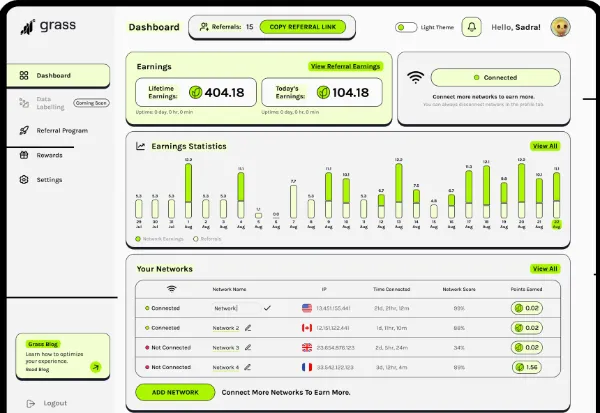
In the simplest terms, GRASS is a platform that lets you earn passive income by selling your unused internet bandwidth.

But here’s the kicker – it does this without compromising your privacy. We’re talking about a system that allows verified companies to utilize your idle bandwidth without getting anywhere near your personal info.

The companies are thoroughly vetted and monitored to ensure everything’s on the up and up, with no room for misuse or illegal shenanigans.

How Does It Work?

You essentially allow the platform to utilize your unused internet bandwidth to earn money from GRASS.

By installing the GRASS application on your device and configuring it, you contribute to a network that supports AI research and development.

As your bandwidth is used, you accumulate points or credits, which can then be converted into various forms of payment, such as cryptocurrencies, PayPal, or gift cards.

It uses a tiny fraction of your capacity (up to 0.3%) and only kicks into action when you’re not using your full internet capacity.

This means your Netflix binge-watching sessions remain uninterrupted. The platform is a dream come true for AI labs needing massive amounts of web data to train their AI models.

What Does Grass Do With Your Internet Bandwidth

Creating AI models is a data-hungry process, requiring vast quantities of information from the internet. GRASS steps in to streamline this by offering two pivotal services.

Firstly, it empowers AI research labs with tools to harvest web data directly, catering to their specific needs for AI model training.

Secondly, GRASS goes a step further by providing pre-assembled data sets, meticulously compiled using its specialized network designed for efficient data collection.

This dual approach simplifies the data acquisition process and ensures AI developers have access to unrefined and processed data, enhancing their development workflow significantly.

Start Earning Money From GRASS

You’ll typically need to follow a straightforward installation and setup process to use GRASS and earn from your unused bandwidth.

Download the application on the Google Play Store or Chrome Extension Store, sign up, and start earning.

Once set up, the platform works in the background, seamlessly integrating with your internet usage without affecting your browsing or streaming activities.

Getting Rewarded & Payout

Wondering how you’ll get your hands on your earnings?

GRASS has covered you with diverse payment options, including cryptocurrencies, gift cards, and PayPal.

The rewards are seamlessly credited to your account, making the entire process as smooth as peanut butter.

Conclusion

GRASS is more than just a platform; it’s a movement towards a more efficient and privacy-respecting internet.

Leveraging what’s already there (your unused bandwidth) offers a smart way to earn passive income while contributing to advancing AI technologies.

So, if you want to get in on the ground floor of something big, GRASS might just be your ticket.

There you have it, folks! A quick dive into GRASS and how it can put money in your pocket for the bandwidth you didn’t even know was there.

It’s a fascinating blend of technology, privacy, and passive income, all wrapped up in one. Ready to join the future of the web? Let’s make our unused resources count!


Earning Money Using GRASS [Unused Internet Bandwidth] Read More »

earn-make-money-sharing-internet-bandwidth-passive-income

13 Ways to Earn Money By Sharing Internet Bandwidth [2025]

In today’s digital age, finding innovative ways to generate passive income has become increasingly popular, and sharing your internet bandwidth is a novel approach.

Numerous software platforms have emerged, allowing individuals to monetize their unused internet capacity simply by running an application in the background.

These platforms cater to various users, from those with unlimited bandwidth plans seeking extra income to tech enthusiasts interested in the burgeoning sharing economy.

Each service offers a unique set of features, payout methods, and earning potential, making it essential to understand how they operate to maximize earnings.


How to Earn Passive Income By Sharing Your Internet Bandwidth

Here are the eleven (11) ways you can make money by utilizing your bandwidth;


Pawns.app is a platform that lets users monetize their unused internet bandwidth by sharing it with the network.

Users download the app, share their internet connection, and earn money. It’s designed to be simple and user-friendly, making it accessible for anyone to start earning passive income.

  • Minimum Payout Amount: USD $5
  • Payout Method: Visa gift cards, PayPal, Bitcoin, and Amazon gift cards.
  • Earning Platforms: Install on Windows, macOS, Android and command line (CLi)

Honeygain is an innovative app that turns unused internet bandwidth into an opportunity to earn passive income.

By running the Honeygain app on your devices, you can contribute to a more extensive data network businesses use for web intelligence and content delivery.

This app is designed to be user-friendly, secure, and unobtrusive, ensuring internet sharing doesn’t interfere with your daily online activities.

Earning Money with Honeygain:

  • Minimum Payout Amount: USD $20
  • Payout Method: via PayPal or JumpToken (JMPT)
  • Earning Platforms: Install on Windows, macOS, Linux, iOS and Android.

Repocket is a platform that allows individuals to earn passive income by renting out their unused internet bandwidth.

Users can easily sign up, install the application, and start sharing their internet connection, enabling businesses and services to leverage this bandwidth for various online activities.

This innovative approach offers a simple way for anyone with an internet connection to generate additional income without any active effort.

  • Minimum Payout Amount: USD $20
  • Payout Method: PayPal and Wise transfer.
  • Earning Platforms: Available for Windows PC, Mac, Android, IOS, Linux and Docker. 

PacketStream is a platform that allows users to earn money by sharing their unused internet bandwidth.

Individuals can become part of a global Peer-to-Peer Privacy Marketplace, providing businesses and developers with secure and reliable access to web data.

This service not only capitalizes on idle internet resources but also supports a variety of online operations, making it a mutually beneficial ecosystem.

  • Minimum Payout Amount: USD $5
  • Payout Method: PayPal
  • Earning Platforms: Available for Windows PC, Mac, and Linux. 

Earn App offers a unique opportunity for individuals to monetize their unused internet bandwidth. Installing the app on your devices allows businesses to use a small portion of your internet connection for their operations.

In return, you earn money. This app appeals to those with internet plans with large or unlimited data allowances and who want to make extra cash without effort.

  • Minimum Payout Amount: USD $5
  • Payout Method: via PayPal or Amazon gift card
  • Earning Platforms: Install on Windows, macOS, Linux, iOS, Android and Raspberry.

PacketShare is an app that allows you to earn passive income by sharing your unused internet bandwidth from your phone or computer, making it a convenient option for those seeking a hands-off side hustle.

  • Minimum Payout Amount: USD $10
  • Payout Method: via PayPal, USDT (TRC20)
  • Earning Platforms: Install on Android, Windows

7. Traffmonetizer

Traffmonetizer allow individuals to earn passive income by leveraging their unused internet bandwidth.

Users download a simple application, allowing the platform to utilize their spare network capacity in exchange for compensation.

This innovative approach provides an effortless way to monetize internet connectivity that would otherwise remain idle.

  • Minimum Payout Amount: USD $10
  • Payout Method: PayPal, Bitcoin, Payoneer, Skrill, Payeer and Wire Transfer
  • Earning Platforms: Available on Windows, macOS, Linux and Android

Gener8 is a platform that lets you earn passive income by sharing your browsing data through its app, browser, or Chrome extension.

It’s designed to give you control over your data, allowing you to earn points for gift cards or donations while maintaining privacy through anonymized data collection for market trends.

  • Minimum Payout Amount: Varies by reward, typically equivalent to $5-$10 in points for gift cards
  • Payout Method: Gift cards (e.g., Tesco, Amazon, Spotify, Netflix), charitable donations, exclusive brand offers
  • Earning Platforms: Android, iOS, Windows, macOS (via Gener8 Browser or Chrome extension)

Mysterium Node is part of a decentralized network that allows users to share their internet connection and earn digital currency.

By running a node, you contribute to the network’s infrastructure, providing services like VPN to others and receiving MYST tokens as compensation.

Earning with Mysterium Node:

  • Minimum Payout Amount: 5 MYST
  • Payout Method: Withdraw to an exchange (e.g., Binance, OKX) or a mobile wallet like MetaMask.
  • Earning Platforms: Install on Windows, macOS, Linux, and Android.

10. Proxyrack

Proxyrack is a service that allows individuals to become part of a global peer network by sharing their internet connection. In return, they can earn passive income.

The platform focuses on providing secure and anonymous proxy services to businesses and individuals worldwide.

  • Minimum Payout Amount: USD $5
  • Payout Method: PayPal, Gift Cards and Wire Transfer
  • Earning Platforms: Available on Windows and Linux

11. LoadTeam

LoadTeam is a platform that allows users to make money by running a Windows application that utilizes their computer’s idle processing power.

Users can earn income by performing small tasks or processing transactions without hindering their computer’s performance.

  • Minimum Payout Amount: USD $1
  • Payout Method: PayPal
  • Earning Platforms: Available on Windows

12. Cash Raven

Cash Raven is a platform that enables individuals to earn passive income by sharing their unused internet bandwidth.

By downloading and running the Cash Raven application, users contribute to a network that leverages this bandwidth for various services, earning money in return without disrupting their everyday internet use.

  • Minimum Payout Amount: USD $15
  • Payout Method: PayPal
  • Earning Platforms: Available on Android 

13. Spider Income

Spide enables users to earn by sharing their internet bandwidth. By joining as a peer and using their software, individuals can turn unused bandwidth into a source of income.

  • Minimum Payout Amount: USD $10
  • Payout Method: Litecoin
  • Earning Platforms: Available on Windows, macOS and Linux

Conclusion

Exploring the realm of internet bandwidth-sharing platforms opens up a novel avenue for earning passive income.

These services capitalize on underutilized resources and contribute to a broader digital ecosystem.

As with any venture, it’s vital to weigh the benefits against potential concerns like security and bandwidth usage.

With the right approach and platform choice, turning unused internet bandwidth into an income stream can be a smart move in the digital age.


13 Ways to Earn Money By Sharing Internet Bandwidth [2025] Read More »

featured-image-neutron-ntrn

GUIDE to Neutron (NTRN) Token: [Tokenomics + How to BUY]

Neutron (NTRN) stands as a distinctive and innovative player in the broader landscape of the cryptocurrency world.

But what exactly is it, and where does it fit in the grand scheme of crypto?


Firstly, Neutron is not categorized as a traditional Layer 1 or Layer 2 project. Instead, it exists within the Cosmos ecosystem, renowned for its interoperability and modular framework.

This positions Neutron as a part of a more extensive, interconnected network of independent blockchains, all unified under the Cosmos umbrella.

Neutron’s ecosystem is unique. Rather than being a standalone entity, it integrates seamlessly into the Cosmos ecosystem, leveraging the power and flexibility of the Cosmos SDK and Tendermint consensus mechanism.

This integration allows Neutron to interact and transact across different blockchain networks, a cornerstone feature of Cosmos’ vision for an ‘Internet of Blockchains.’

Regarding its crypto narrative, Neutron falls into the realm of cross-chain interoperability and decentralized finance (DeFi).

The Vision and Technology Behind Neutron

The vision behind Neutron is to create a seamless, scalable, and developer-friendly environment for building decentralized applications (dApps) that can interact across blockchains.

The technology underpinning Neutron includes CosmWasm for smart contracts, Interchain Queries (ICQs) for fetching data from other chains, and Interchain Accounts for executing transactions on foreign chains, all contributing to a robust DeFi ecosystem.

Key Features of Neutron (NTRN)

Neutron’s key features are centered around its role as a facilitator of cross-chain interaction.

By using NTRN, developers can leverage in-protocol automation, custom fees, and mempools to build efficient dApps without the overhead of managing their own blockchain.

For users, this means access to a broader range of services, improved liquidity, and enhanced security in their DeFi experiences.


CategoryPercentage of Total SupplyAmount of TokensUnlocking ScheduleAdditional Details
Airdrop7%70 millionUnlocked over 3 months post-launchOptional lock-up with voting power during transfer restrictions. Tokens are allocated via airdrop and launch event.
Treasury30% (Edited from 44%)300 millionLiquidFreely allocated by DAO.
Reserve24% (Edited from 10%)240 millionLocked, released based on network activityDirected by Governance via the Distribution contract.
FoundersNot specifiedNot specifiedLocked for 1 year, then linearly over 3 yearsNo voting power during transfer restrictions.
Early BackersNot specifiedNot specifiedLocked for 1 year, then linearly over 3 yearsVoting power during transfer restrictions.
CommunityNot specifiedNot specified3 months unlocking periodTokens held in DAO’s Reserve and Treasury used or transferred with majority voter approval.
Neutron DAONot specifiedNot specifiedMostly liquidTokens held in DAO’s Reserve and Treasury, used or transferred with majority voter approval.
Table showing Neutron tokenomics distribution

Transaction Fees and Governance

NTRN tokens are not just a digital asset; they are integral to the functioning of the Neutron ecosystem.

Users pay transaction fees in NTRN to interact with the network, providing revenue to maintain and secure the platform.

Governance is another critical utility—holding NTRN grants you the right to vote on proposals, influence development decisions, and help shape the future of the Neutron platform.

Staking and Rewards

Staking is a core component of participating in the Neutron ecosystem. By staking NTRN tokens, you contribute to network security and, in return, earn rewards.

This process involves locking up your tokens to support the network’s validators and can be a great way to accumulate more NTRN over time.

Interchain Operations with NTRN

Neutron’s standout feature is its facilitation of interchain operations. This allows Neutron to interact seamlessly with other blockchains in the Cosmos network, enabling transactions and smart contract operations across different chains.

NTRN plays a pivotal role here, being used to register interchain accounts and execute cross-chain transactions, making it a linchpin of Neutron’s interoperability ambitions.


You should consider getting Neutron (NTRN) from these reliable exchanges and platforms listed below;

Binance

interface-of-using-binance-to-buy-cryptocurrency

You can purchase Neutron (NTRN) tokens easily on the Binance exchange. Here’s what sets it apart from other exchanges.:

  • Unmatched Variety of Tokens: Binance leads the pack by listing over 400+ cryptocurrencies and allows trading in 1500+ markets.
  • Top Trading Volume: Binance is the powerhouse of crypto trading. High trading volumes mean you get competitive prices and better liquidity.
  • Competitive Fees: Enjoy some of the lowest trading fees in the industry with Binance. This means more savings and more trading for you.
  • Secure & Reliable: Your security is paramount. Binance is known for its robust security measures, giving you peace of mind as you trade.

KuCoin

kucoin-crypto-exchange

Neutron (NTRN) tokens are available to buy on the KuCoin exchange.

  • Extensive Cryptocurrency Selection: KuCoin offers spot trading for a diverse range of cryptocurrencies, including popular ones like Bitcoin (BTC), Ethereum (ETH), and Ripple (XRP), as well as a wide array of altcoins.
  • KuCoin Shares (KCS) Rewards: KuCoin offers the unique advantage of KuCoin Shares (KCS) rewards. By holding KCS, you receive daily bonuses and trading fee discounts, providing an extra incentive for long-term investors.
  • Margin Trading without Borrowing: Unlike Binance, KuCoin allows margin trading without borrowing, making it more straightforward for traders to access leverage for potential gains.
  • KuCoin Futures Lite: KuCoin’s Futures Lite platform offers a simplified and user-friendly way to engage in futures trading, making it accessible to traders of all levels.
  • Flexible Trading Strategies: KuCoin provides a range of trading strategies, including grid trading and dollar-cost averaging (DCA), allowing you to diversify your trading approach.

Using a hardware crypto wallet is the ultimate choice for security-conscious individuals, as it offers unparalleled protection by keeping your private keys offline & safeguarding your digital assets from online threats.

Neutron (NTRN) runs on the Cosmos (ATOM) ecosystem, and these are the crypto wallets that support it.

Ledger (Hardware Wallet)

  • Extensive Cryptocurrency Support: Ledger boasts a wide-ranging selection of supported cryptocurrencies, ensuring you can secure the mainstream coins and explore the world of niche digital assets effortlessly.
  • Unrivaled Hardware Security: Ledger hardware wallets employ cutting-edge Secure Element technology, isolating your private keys within a tamper-resistant chip. This robust hardware security prevents unauthorized access, ensuring that your crypto assets remain impervious to hacking attempts.
  • Two-Factor Authentication (2FA): Ledger offers an additional layer of security through its 2FA feature, requiring physical confirmation for transactions. This means that even if your wallet is compromised, a hacker cannot make unauthorized transfers without your explicit confirmation on the device.
  • Firmware Integrity: Ledger ensures the integrity of its firmware through a secure boot process, preventing any tampering or malware installation. Regular firmware updates also address vulnerabilities, enhancing overall wallet security.

MetaMask (Software Wallet)

metamask-software-cryptocurrency-hot-wallet
  • User-Friendly Web Browser Extension: MetaMask is a user-friendly browser extension that integrates seamlessly with popular browsers like Chrome and Firefox, making it accessible and convenient for crypto enthusiasts.
  • Secure and Private: It offers robust security features and ensures your private keys are encrypted and stored securely, putting you in control of your crypto assets.
  • Interoperability: MetaMask supports various blockchains, enabling you to manage cryptocurrencies and tokens within a single wallet.
  • Web3 Integration and Smart Contracts: MetaMask is engineered to seamlessly integrate with Web3, enabling users to interact with decentralized applications (DApps) and execute complex smart contracts directly from their wallet, expanding the possibilities of crypto usage.

Q1: Can NTRN be purchased with fiat currency?

Yes, NTRN can be purchased with fiat currency on certain exchanges. You’ll need to find an exchange that supports fiat to crypto transactions and lists NTRN.

Typically, this involves buying a base cryptocurrency like Bitcoin or Ethereum with fiat and then exchanging it for NTRN.

Q2: Can Neutron (NTRN) Be Mined?

The ability to mine Neutron (NTRN) depends on its blockchain structure and consensus mechanism. Neutron uses a Proof of Work (PoW) system, therefore mining is not possible.

Q3: What makes Neutron (NTRN) unique in the Cosmos ecosystem?

Neutron stands out in the Cosmos ecosystem because it focuses on interchain operability and smart contract functionality.

Its use of the Cosmos SDK and Tendermint BFT, along with features like Interchain Queries and Accounts, positions it as a versatile platform for cross-chain interactions and DeFi applications.

Q4: How does staking work with NTRN?

Staking NTRN involves locking your tokens in support of a network validator. In return, you receive staking rewards, contributing to the security and efficiency of the Neutron network.

The straightforward process can be done through compatible wallets that support staking.


In conclusion, Neutron (NTRN) presents itself as a significant player in the realm of cryptocurrencies, particularly within the Cosmos ecosystem.

Its unique approach to fostering cross-chain interoperability and smart contract functionality sets it apart as a potential game-changer in the decentralized finance (DeFi) sector.

Whether you’re a crypto enthusiast, a developer, or an investor, understanding and utilizing NTRN tokens can offer a gateway to a new realm of blockchain possibilities.

As with any investment, it’s crucial to approach NTRN with a strategy that aligns with your financial goals and risk appetite.

The blend of technological innovation and practical utility that NTRN offers is compelling, yet staying informed and adaptable is essential as the cryptocurrency landscape continues to evolve.

This guide aims to provide a comprehensive overview of Neutron (NTRN), from its fundamentals and acquisition to its utilization and strategic management.

With this knowledge, you’re better equipped to navigate Neutron’s exciting world and harness its token’s potential, NTRN, in your crypto journey.


GUIDE to Neutron (NTRN) Token: [Tokenomics + How to BUY] Read More »

register-telegram-verify-sms-otp-code-without-sim-phone-number

3 Proven Ways to Verify Telegram Without SIM Phone Number

When registering for a new Telegram account, the app requires you to provide a phone number to verify you with a five-digit one-time password (OTP) via SMS text message.

Currently, the only way to activate a new Telegram account is by providing a valid phone number.

Sometimes, there are valid reasons why we do not want to give our personal mobile number, e.g., for privacy and work-personal separation.

There are different ways to bypass the need to use a SIM phone number to receive the Telegram SMS verification code.

How to Receive Telegram Verification Code Without Using a Personal SIM Phone Number?

Here are the three (3) ways to do so.


Method 1: Use a Virtual Number App

Several secondary phone number apps on the AppStore or Playstore offer a virtual second-line number for your calling and texting needs.

These second-line apps are installed onto your phone, and you can have multiple (as many as you like) phone numbers as you want.

Here are some virtual number apps you can use;

Hushed

Hushed offers several features, including call forwarding, custom voicemail greetings, receiving SMS verification codes (OTP), and making and receiving phone calls.

The second-line app allows users to get their chosen mobile number for a very short time, e.g., seven days.

This is suitable for those who want to register accounts on social media and email accounts within a few days.

  • Install the Hushed app on your mobile phone.
  • Choose the country of the mobile number you want, e.g., from Canada or the U.K.
  • Every purchased mobile number is renewable before the expiry date.

Numero eSIM

Users can make low-cost calls with Numero eSIM‘s secondary mobile number and send and receive SMS messages.

You can also use it to obtain Telegram SMS verification codes.

When using Numero, users can accept incoming calls for free everywhere in the world.

You can choose virtual numbers from over 80+ countries and over 4000+ cities.

  • Make calls and receive SMS messages.
  • International WiFi calling at local rates with Local calling plans.
  • Voicemail and Call forwarding features
  • Privacy Caller-ID (hide your number) for local and international calls

Method 2: Use an Online SMS Service

Certain online web services offer free temporary mobile numbers for receiving SMS text messages.

Since these virtual numbers are free to use on their websites, you can use them to receive OTP codes and register for a new Telegram account.

Here are some reliable sites where you can receive SMS OTP codes.

Keep in mind that mobile numbers on free sites tend to run out quickly, and these sites don’t offer new numbers very often.

Consider getting a paid virtual number service because it is a more reliable approach, as you are the only one using that number. OnlineSIM offers such a personalized virtual number service.

Telegram may occasionally require its users to confirm their cell phone numbers. Therefore, if you intend to use your Telegram account for a long time, you might want to think about renewing these virtual phone numbers.


Method 3: Receive Phone Call Verification

An alternative way is to get Telegram to call you instead of receiving the SMS OTP code on your phone.

You will retrieve the OTP code when you listen to the automated phone message.

  • During registration, you provide Telegram with the virtual mobile number
  • When asked to verify and enter the 5-digit SMS OTP verification code, select the option <Didn’t get the code>.
  • Telegram will attempt to call you on the number you provided.

For that, there are several online international phone calling (and voicemail services) that you can use.

Talkroute

Talkroute is a virtual phone system suitable for businesses and individuals who are always on the move.

Users can make and receive international phone calls, manage SMS texts, and reply to voicemail messages using desktops, computers, web browsers, and mobile devices. 

To receive verification OTP code from Telegram, you can use Talkroute to receive and listen to incoming phone calls.


3 Proven Ways to Verify Telegram Without SIM Phone Number Read More »